AI Visibility
When someone asks an AI assistant a question like "best marketing agency for B2B SaaS," your brand either comes up or it does not. AI Visibility is where you see how a brand is showing up in those answers, and what to do to show up more often. You pick a brand at the top, and everything on the page is about that brand.
The page is organized into tabs across the top. Each tab answers a different question: how visible am I, what should I fix first, who is getting cited instead of me, what are my competitors doing, where do I rank, and how is this trending month to month. A second screen, the tracked question list, decides exactly which questions get measured in the first place.
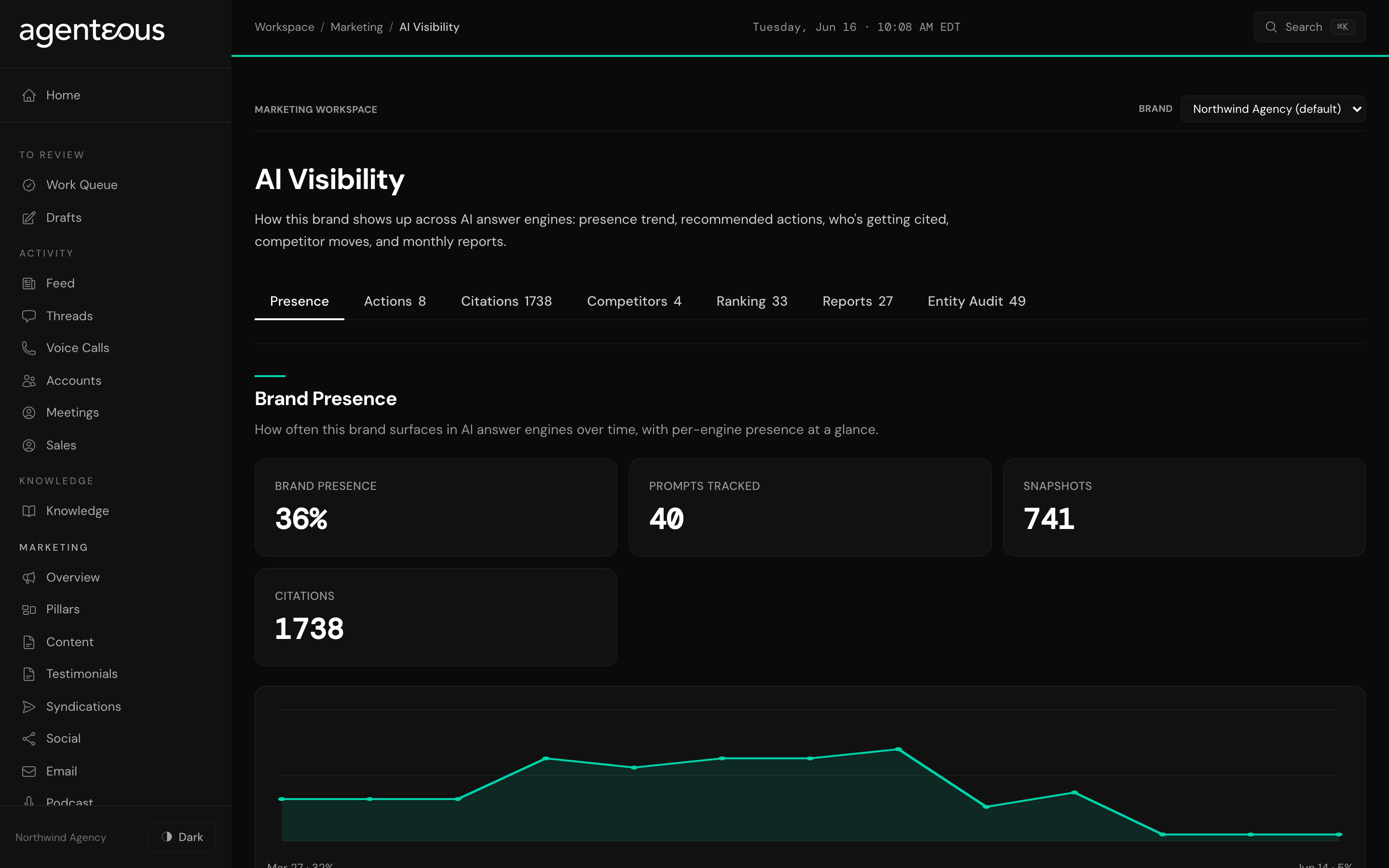
What You See
The tabs run across the top. Click one to switch between them.
Presence is the home view. A headline presence score tells you how often the brand surfaces in AI answers. Next to it you see how many questions are being tracked, how many checks have run, and how many times your sources were cited. A trend chart shows whether presence is climbing or slipping over time. Below that, each AI assistant gets its own small card with its own presence. When an assistant is not yet connected, its card is dimmed and labeled so you know that engine is not contributing data yet, rather than the brand simply scoring zero there.
Actions is a prioritized to-do list. Each item is a concrete way to win visibility on a question where the brand is currently absent. Items are grouped by urgency, from "Do Now" through "Quick Win," "Plan," and "Deprioritize," so you can start at the top.
Citations shows which sources AI assistants point to when they answer your tracked questions: which kinds of sources, which assistants lean on which, and the specific pages and domains that get cited most. This tells you where the credibility is coming from, and where you might want your own pages to be.
Competitors is your watchlist. It lists the competitors being tracked for the brand, and below them, the recent changes the watch has picked up: a competitor publishing something new, changing pricing, hiring, and so on. Each change carries a short plain-English summary.
Ranking is a keyword table. For each tracked keyword you see its latest search position, its search volume, the page it points to, and when it was last checked. Keywords with no position yet read as unranked.
Reports holds the monthly write-ups. Each one is a summary of how the brand did over a period, with a short narrative you can read on the page and a downloadable copy you can share.
Entity Audit gives the brand a single health score for how well established it is across AI assistants, broken into the parts that make it up (such as how present it is, how authoritative the sources citing it are, and how broadly it shows up across assistants). Underneath the score sits a short list of the top fixes worth making, each with the reason and what to do.
What You Can Do
Most of the page is for reading, but a few buttons let you act:
- Generate a fresh action list. On the Actions tab, ask the page to turn the current visibility gaps into a new prioritized to-do list.
- Clear actions as you work. Mark an action done once you have handled it, or dismiss one you are not going to do. Either way it leaves the list.
- Acknowledge a competitor change. On the Competitors tab, mark a detected change as seen so it stops standing out.
- Run an entity audit. On the Entity Audit tab, ask for a fresh health score and an updated list of top fixes.
- Download a report. On the Reports tab, save a monthly write-up to share with a client or your team.
Managing the tracked question list
The tracked question list is the most important control on this whole feature, because it decides what gets measured. Each entry is a real question a buyer might type into an AI assistant. The weekly monitor runs against exactly this list, so if a question is not on it, the brand's visibility for that question is never checked.
You manage the list on its own screen. Here is what you can do there:
- Add a question. Type the question a buyer would ask. You can give it an optional category to keep things organized.
- Edit a question. Change the wording of an existing question in place.
- Retire a question. Switch a question off so it stops being checked, without deleting it. You can switch it back on later, or remove it for good.
- Link a question to a content pillar. Tie each question to one of your content themes so the visibility you earn maps back to your strategy. The page can suggest a fitting pillar for you, which you can accept or change.
- Accept suggested questions. The page surfaces suggested questions drawn from gaps and trends. Accept the ones worth tracking, dismiss the rest, or accept them all at once.
Two small counters at the top tell you how many questions are active right now and how many of them are linked to a pillar.
How It Connects
The monitoring behind this page is run by the SEO agent. It does the watching, the checking, and the scoring; you review what it finds and decide what to act on. The tracked question list is where the two meet: you curate the questions, and the agent measures the brand against them every week. For a fuller picture of what the SEO agent does, see Marketing SEO.
:::tip Start with the questions Before you read the scores, make sure the tracked question list reflects how your buyers actually talk. A handful of accurate, well-chosen questions tells you more than a long list of ones nobody would ask. Linking each to a content pillar then lets you connect the visibility you win back to the work your team is already doing. :::