Testimonials
Your clients say good things about your agency on calls all the time. The Testimonials page is where that praise gets caught, checked, and turned into something you can reuse. Agenteous listens to the meetings it has transcripts for, pulls out the genuine compliments, and lines them up for you to look over. You decide what is real, confirm you have permission to use it, and publish the ones worth keeping into a library your content can draw on.
This page handles the whole path: a candidate praise quote arrives, you approve or reject it, you record whether the client agreed to be quoted, you save a clean or anonymized version if you need one, and you publish it. Nothing reaches the library until you have signed off, and an anonymized testimonial only ever shows its safe version, so a named client is never exposed.
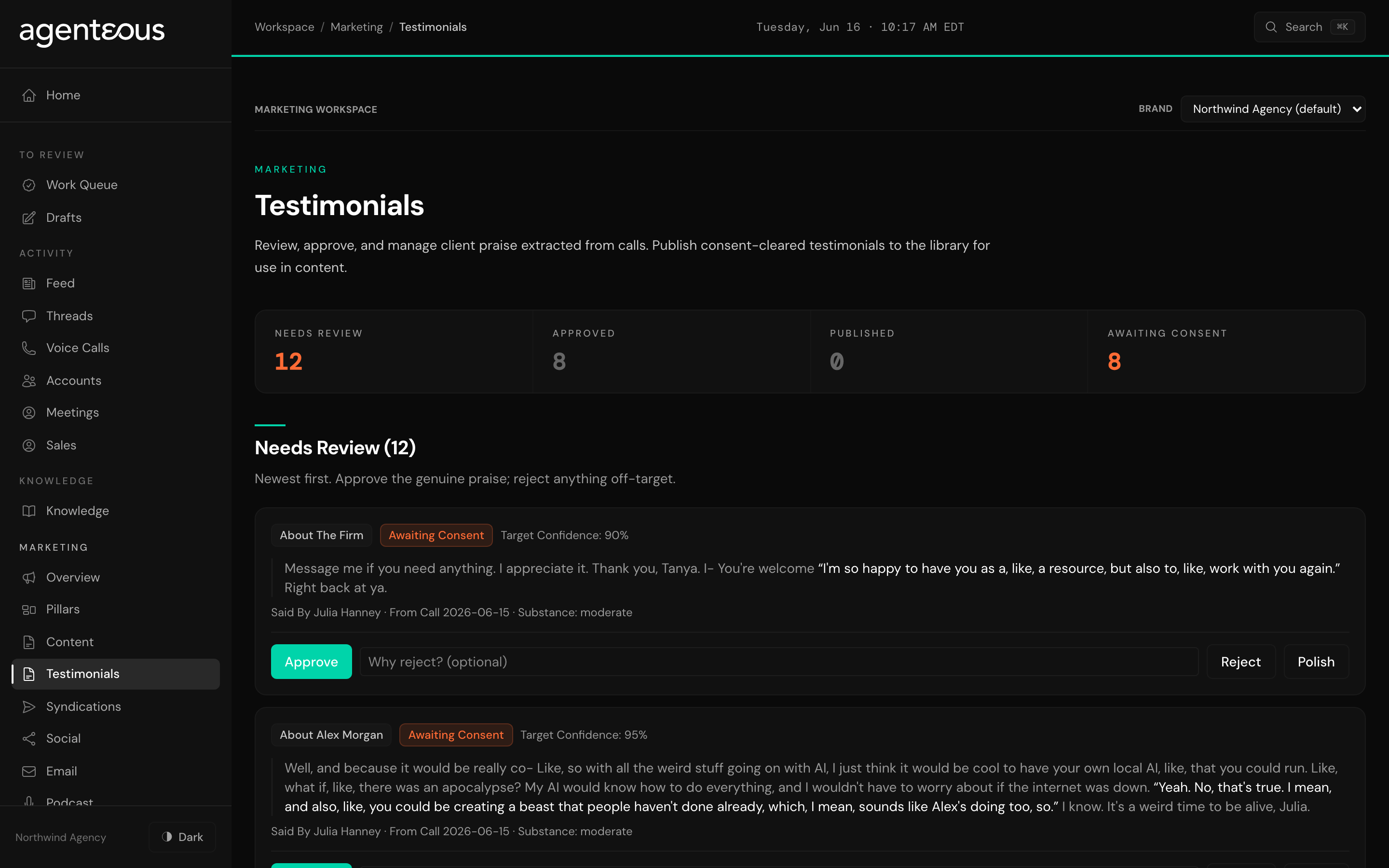
What You See
The top of the page shows four counts so you know where things stand at a glance:
- Needs Review: praise the system found that you have not looked at yet.
- Approved: quotes you have accepted but not yet published.
- Published: testimonials that are live and ready to use.
- Awaiting Consent: approved quotes that are still missing a recorded yes from the client.
Below the counts, the page is laid out in three parts that follow the life of a testimonial.
Needs Review is the queue of candidate quotes, newest first. Each one shows the praise itself, who said it and from which company, the date of the call it came from, and how confident the system is that it tied the quote to the right person. This is raw material: real words from a real call, waiting for your judgment.
Library is everything you have approved, whether or not it is published yet. Each row here carries its consent status as a plain label (Awaiting Consent, Consent Requested, Consent Granted, Consent Denied, or Consent Withdrawn) and a tag if it has been anonymized. This is where you record consent, save a cleaned-up version of the wording, mark a quote anonymized, and publish or pull it back.
Published is the browse-and-use list of live testimonials. Each one is shown the way it will appear to the outside world, with its attribution beneath it, plus buttons to copy the quote or a ready-made embed snippet, and a star to mark your favorites. You can filter this list to show all of them, only your starred ones, only praise about the firm, or only praise about a specific person on your team.
A quote that has been anonymized always shows its safe, de-identified wording here, never the original. The original stays in the review tools and never reaches the public list.
What You Can Do
Work the Needs Review queue. For each candidate you can:
- Approve it, which moves the quote into your Library so you can prepare it for use.
- Reject it if it is off-target, not really praise, or something you would never want to publish. You can add a short reason, which is optional.
- Polish the wording, which cleans up filler and false starts from a spoken quote without changing what was said. The original is always kept so you can see what was actually spoken.
Prepare a quote in the Library. Once a quote is approved, you get it ready to publish:
- Record consent. Choose whether the client granted permission with attribution, granted it only if anonymized, or denied it, and note how you got that permission (an email reference or a contract clause, for example). This is the gate: a quote cannot be published until consent is recorded as granted.
- Save a clean version. Edit the spoken quote into a tidy, publishable form. The published list shows your clean version; the original spoken words are still kept underneath for your reference.
- Save an anonymized version. When a client agreed only on the condition of anonymity, write a safe version of the quote that carries the sentiment without naming or hinting at who said it, then mark it anonymized. From then on, only that safe version is ever shown.
- Publish the quote so it becomes live and usable, or Unpublish to quietly pull it back out of circulation if something changes.
- Star the ones you reach for most, so they are easy to find later.
Use a published testimonial. On the Published list, copy a quote on its own, or copy an embed snippet that includes the quote and its attribution already formatted, ready to drop into a page or a post.
If you try to publish before consent is granted, the page stops you and explains why, so a testimonial can never go out without permission on record.
How It Connects
The candidates in Needs Review do not come from nowhere: the Meeting Assistant listens to the calls it has transcripts for, recognizes genuine client praise, and files it here for you to review. You can read more about that on the Meeting Assistant pages.
Once you publish a testimonial, it stops being a one-off. Published testimonials flow into your verified proof library and become available to the agents that write your content, so a cleared quote can be cited in a blog post, a landing page, or a social piece. The Marketing Proof Points pages explain how that library is used. Approving and publishing here is what makes a quote safe for the rest of Agenteous to lean on.
Record consent in plain terms while it is fresh. When a client agrees on a call or by email, note exactly how you got that yes in the consent source field. If a client only agrees to an anonymous quote, write the anonymized version carefully so it carries the praise without any detail that points back to them: that safe version is the only thing anyone outside your agency will ever see.