Finding Prospects
Finding Prospects is where you grow the list of people worth selling to. It does two jobs in one place. The first is Prospect Discovery: you hand over company website domains and get back the decision-makers at each one, with contact details and an honest read on how reliable each detail is. The second is the Hot List: a short, daily-ranked shortlist of the firms most worth your attention right now, with the reasons each one rose to the top. Together they answer "who should I be reaching out to, and who first."
What You See
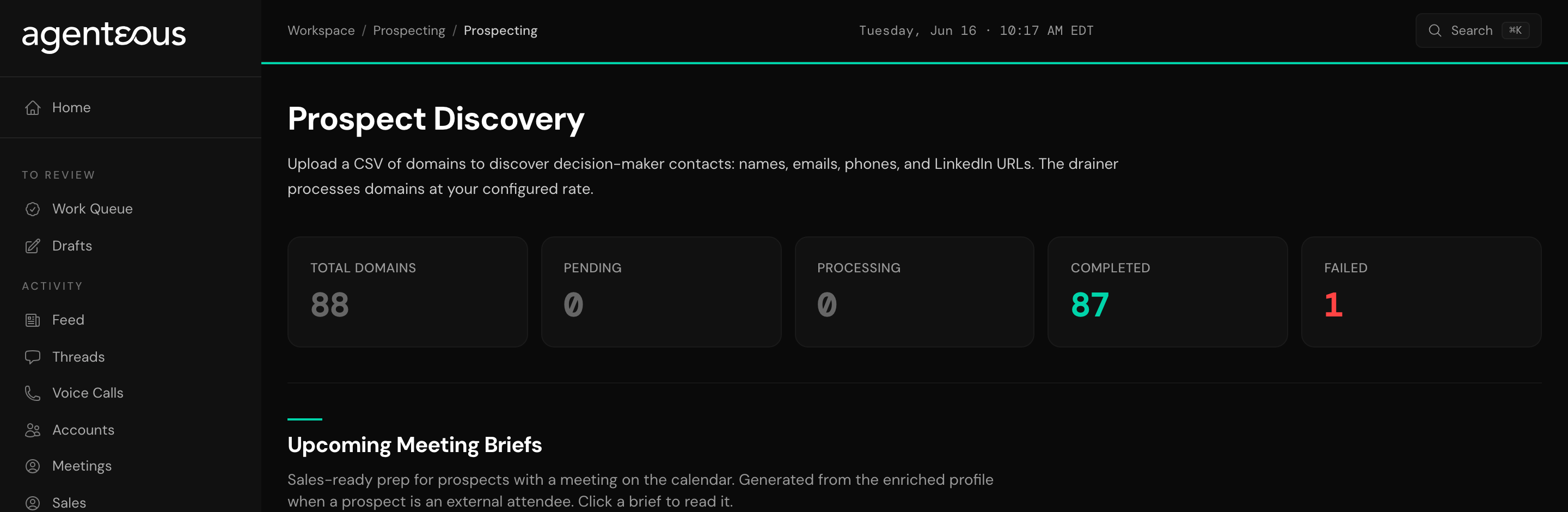
Prospect Discovery has three parts on the page.
An upload area, where you add company website domains. Drop in a CSV with one domain per row (an optional second column can carry the company name), or paste a list of domains, one per line. Bare domains, full URLs, and www-prefixed addresses all work; re-uploading the same list is safe, since domains already on the list are skipped.
A domain queue, which is the running status of every company you have submitted. Each row moves through four states:
- Pending: queued, not started yet.
- Processing: research is underway.
- Done: contacts have been found and are ready to read.
- Failed: the research could not complete for that company.
A counter strip across the top shows how many domains you have in total and how many sit in each state.
Open any company row to see its discovered contacts. Each contact lists a name, title, email, phone, and LinkedIn link, a flag for whether the person looks like a decision-maker, and a confidence level of high, medium, or low. When an email was inferred rather than confirmed, it is marked as a guess, never shown as verified. That honesty is the point: you decide how hard to lean on a contact based on how sure the read is.
Above the queue sits Upcoming Meeting Briefs. When a discovered prospect has an external meeting coming up on the calendar, a prep brief is written for you ahead of time and appears in this list on its own. Open one to read a short summary, who the person is, why they fit, talking points, discovery questions, likely objections, and a recommended next step.
The Hot List is a single ranked table. Each row is a firm, ordered with the highest-priority firm first, and carries:
- a rank and a score,
- the firm name,
- a set of short "why" chips that name the signals driving the rank (a live deal, recent activity, an upcoming meeting, general heat),
- Pin and Exclude actions.
Counters at the top show how many firms are on the list, how many you have pinned, and how many are ranked automatically. The list rebuilds itself every day, so the order reflects what matters now, not last week.
What You Can Do
- Upload or paste company website domains and watch each one move through the queue.
- Open a company to read its discovered contacts and judge each one by its confidence level.
- Read a meeting brief before you walk into a call with a discovered prospect.
- Pin a firm on the Hot List to keep it in view no matter how the daily ranking shifts.
- Exclude a firm that does not belong on your list so it stops taking up a slot.
You do not write outreach here. Discovery and ranking are research: they tell you who to talk to and why. The reaching-out happens elsewhere, and stays your call.
How It Connects
Both halves of this page are powered by the Prospector agent. It does the research, refreshes what it has already found on a regular cadence, keeps your CRM records current, and writes the meeting briefs ahead of time. You direct it by what you upload and read here; it does not message you in Slack. For the full picture of what it does and how it works, see Prospector.
Lead with confidence. When you open a company, sort your attention by the confidence column first: a high-confidence contact with a confirmed email is a far better first call than a low-confidence one with a guessed address. A guessed email can still be right, but treat it as a lead to verify, not a fact.