Sales
What It's For
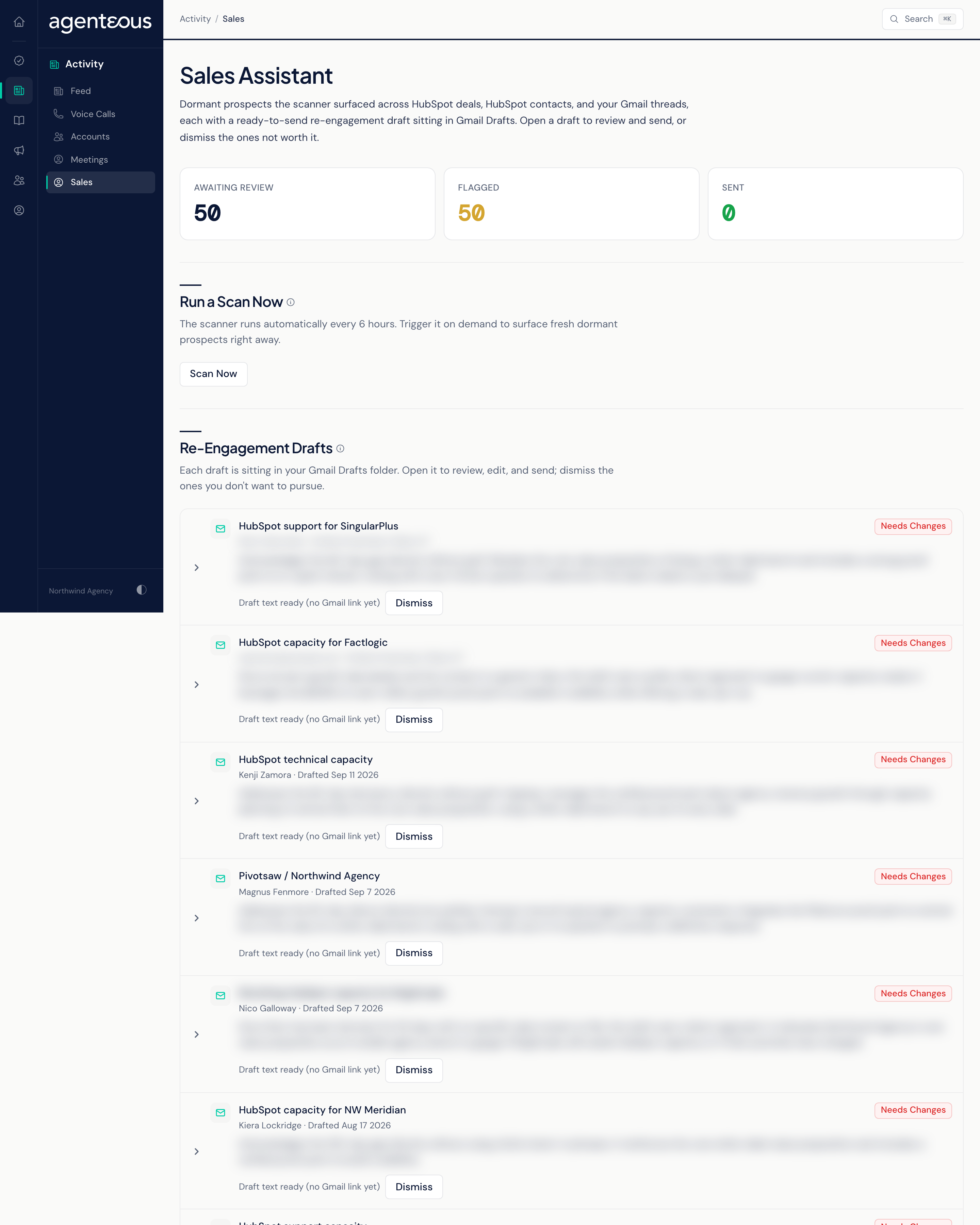
Sales (titled Sales Assistant on the page) lists the re-engagement emails the Sales Assistant has drafted for prospects who have gone quiet. Each draft is already saved in your Gmail Drafts folder. You open it in Gmail to review, edit and send it yourself, or dismiss it. The platform never sends these emails for you.
How Prospects Are Found
The Sales Assistant scans every weekday at 10am and writes up to three new drafts per scan. It looks for four kinds of silence:
- Stale Deal: an open deal in any of HubSpot's standard pipeline stages from Appointment Scheduled through Contract Sent (Appointment Scheduled, Qualified To Buy, Presentation Scheduled, Decision Maker Bought-In, Contract Sent) with no activity for 30 days.
- Dormant Contact: an engaged contact (lead through customer) with no activity for 60 days.
- No Reply: an email you sent that has had no reply for 14 days. Only recipients who are contacts in HubSpot count, so one-off notices are ignored.
- A meeting with an outside attendee and no follow-up email to them within 7 days.
Anyone who has been in touch in any channel in the last 14 days is skipped, so someone you just spoke with is never flagged as dormant. Your operator can limit the scan to particular deal owners or business units in the Operator Console, under Sales, in Sales Assistant.
Each draft is brand-checked against one-to-one email rules when brand checking is turned on, and is then saved to Gmail Drafts. If your workspace uses Slack, an approval card is also posted there.
Counts
- Awaiting Review: drafts you have not dismissed.
- Flagged: drafts carrying a brand-check pill (Flagged, Needs Changes or Blocked), which deserve a closer read before you send them.
- Sent: this count stays at zero. Sending a draft from Gmail is not tracked back to this page.
Run a Scan Now
Scan Now runs every scan straight away instead of waiting for the next weekday run. It drafts up to three emails into your Gmail Drafts and reports, for example, "Scan complete: 2 drafts ready in Gmail, 5 new signals". Anything beyond the first three waits for the next scheduled scan. Scanning sends nothing.
Re-Engagement Drafts
Each row shows the subject, the recipient, when it was drafted, why the prospect was flagged, any brand-check flags, and two buttons:
- Open in Gmail opens the draft in Gmail in a new tab. You edit and send it there. When a draft has no Gmail link, the row reads "Draft text ready (no Gmail link yet)".
- Dismiss removes the draft from this list and marks the prospect handled. That prospect is not flagged again until it goes quiet for a new full period.
When there is nothing to review, the list reads "No re-engagement drafts waiting. Run a scan to surface dormant prospects." If the page cannot load, it reads "Sales Assistant Data Couldn't Load".
Who Uses It
- Sales leads and business development staff: follow up with prospects before they go cold.
- Agency owners: see which deals and contacts have stalled.