Hot 100
What It's For
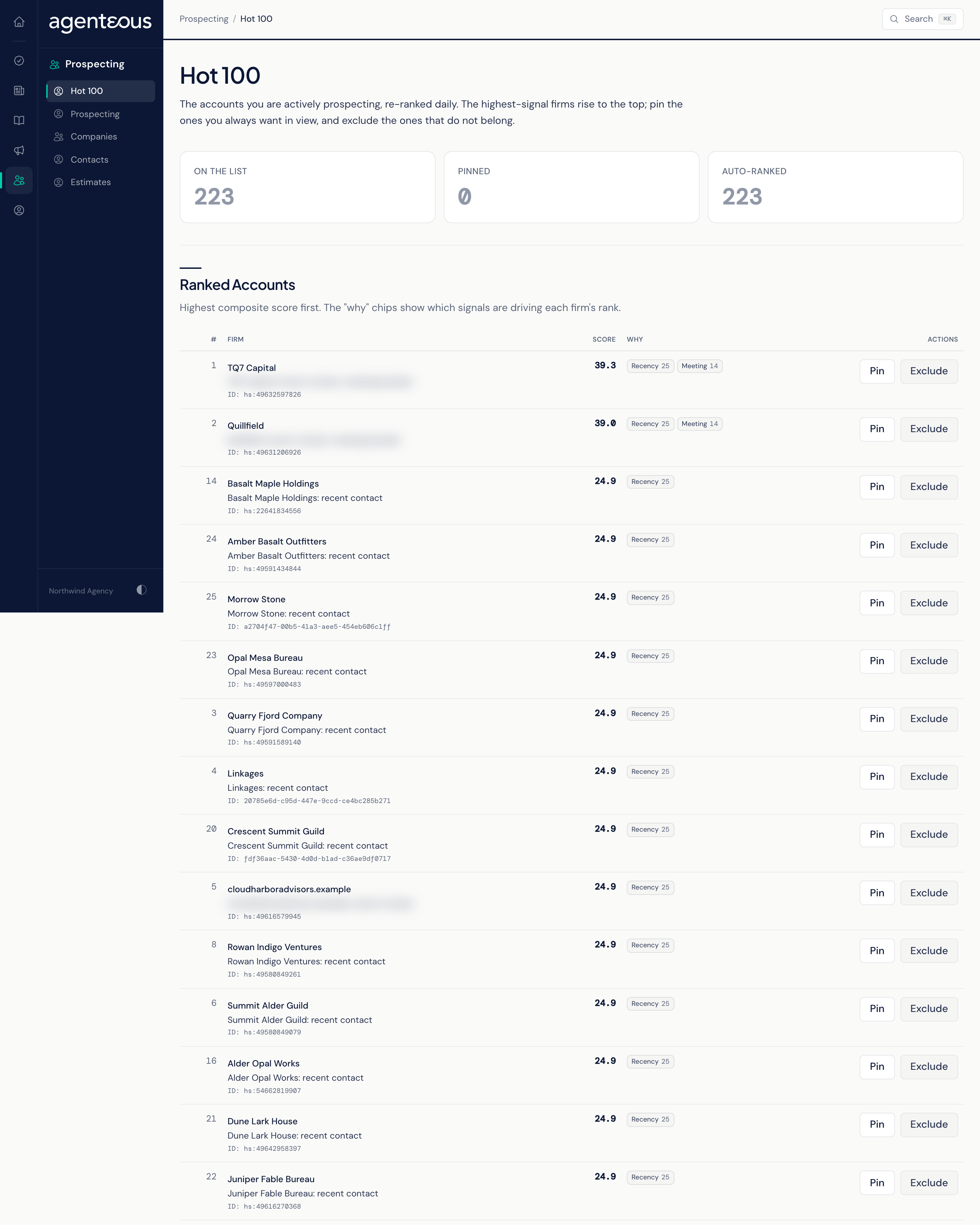
Hot 100 is a ranked list of the firms you are actively prospecting, rebuilt once a day from your HubSpot deals, recent sales activity and buying signals. It tells you where to spend your selling time. You can pin a firm so it keeps its place, or exclude one that does not belong. Nothing on this page sends anything or changes HubSpot.
How the List Is Built
Once a day, Hot 100 gathers candidate firms and scores them. A firm is a candidate if it has an open deal in a late sales stage with recent activity, or a contact at an engaged stage (lead through opportunity) with recent sales activity. Hot 100 is a new-business list, so a firm whose HubSpot stage is customer or evangelist is always left off, even with an open deal. The candidates can also be limited to certain deal owners or business units for your workspace.
Each firm's score, out of 100, adds up weighted parts:
- Deal (up to 40 points): how many open deals the firm has, counting up to three, and their value, counting up to 100,000.
- Recency (up to 25 points): full marks for activity today, falling to nothing as the last touch gets older across the recency window (30 days unless your operator changed it).
- Heat (up to 15 points): the firm's heat from buying signals.
- Meeting (up to 20 points): scores an upcoming meeting with the firm. It comes from the soonest upcoming HubSpot meeting held with any contact of the firm, so the sooner the meeting, the more points. A firm with no upcoming meeting scores zero here, and the Meeting chip appears only when one exists.
The top 100 make the list. To stop firms flickering on and off from day to day, a firm already on the list keeps its place as long as it still ranks in the top 110, and it is only dropped after it has ranked out for two days in a row.
When a firm joins the list, its owner is notified, and the firm is queued for enrichment ahead of other work so its contacts are researched sooner.
Counts
- On the List: how many firms are on it now.
- Pinned: firms you have pinned.
- Auto-Ranked: firms that earned their place by score.
Ranked Accounts
The table lists firms from the highest score down, with these columns:
- #: the rank.
- Firm: the firm's name, with its ID underneath.
- Score: the total.
- Why: chips for the parts driving the score, biggest first. Only parts above zero are shown.
- Actions: Pin (or Unpin) and Exclude.
Pin keeps a firm on the list through every daily re-rank, whatever its score. Unpin lets it compete on score again. Exclude removes the firm from the list at once and keeps it off; exclusion wins over a pin. There is no undo for Exclude on this page.
Pinning and excluding need permission to manage prospecting. If a change fails, you see "Couldn't update the pin. Try again." or "Couldn't exclude this firm. Try again."
When Something Looks Off
- "Hot 100 Isn't Ready Yet" means the list has not been built, or could not be loaded. Hot 100 runs only once it has been turned on for your workspace, and then refreshes daily.
- "No Hot Prospects Yet" means the list ran but found no firms to rank. Check that your deals and contacts are flowing in from HubSpot.
- A firm you expect is missing: it may have no recent activity, be marked as a customer in HubSpot, fall outside your operator's filters, or have been excluded.
Who Uses It
- Sales leads and business development staff: decide which firms to work today.
- Agency owners: see where the pipeline is warm.