Prospecting
What It's For
Prospecting is where you grow your prospect list. On the Discovery tab you hand over company domains, and the Prospector finds the people at each company you would want to talk to. It also shows the prep briefs written for prospects you are about to meet. On the Enrichment tab you watch known contacts being researched. Everything here is research: no outreach is written or sent. When enrichment finishes researching a contact that is already in HubSpot, it fills in that contact's job title and LinkedIn link if they are empty, records when it was last researched, and adds a note with what it found; it does not overwrite a job title or LinkedIn link already there. Discovery writes nothing to HubSpot.
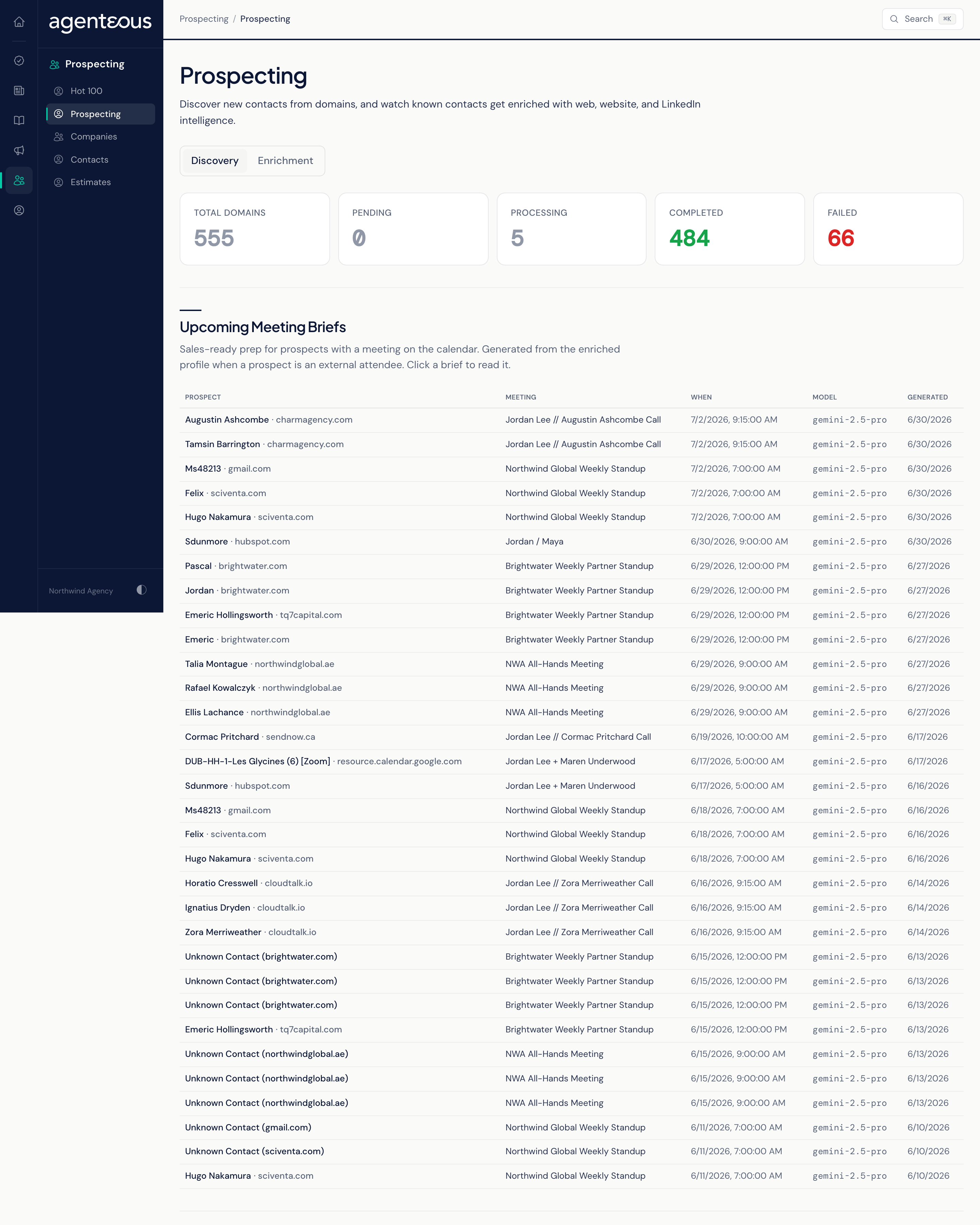
Discovery
The Discovery tab is the default. From top to bottom it shows counts, meeting briefs, the upload panel and the queue.
Counts
Total Domains, Pending, Processing, Completed and Failed: how many domains you have submitted and where they stand.
Upcoming Meeting Briefs
About once an hour, the Prospector looks at your upcoming calendar meetings. When an outside attendee is a prospect it has already researched, it writes a sales prep brief for that meeting, once per meeting. The table shows Prospect, Meeting, When, Model and Generated. Click a row to read the brief:
- TL;DR
- Who They Are
- Why They Fit
- Talking Points
- Discovery Questions
- Likely Objections
- Recommended Next Step
When there are none, the section reads "No meeting briefs yet. Briefs appear here automatically when an enriched prospect has an upcoming meeting on the calendar."
Upload Domains
Add the companies you want researched in either of two ways:
- Choose CSV File: a CSV with one domain per row, and an optional second column for the company name.
- Or Paste Domains (One Per Line).
Domains can be bare (acme.com), full web addresses, or start with www; they are tidied up for you. Click Upload Domains. The result line tells you how many domains were queued and how many duplicates were skipped, so uploading the same list twice is safe.
Domain Queue
Every domain you have submitted, with Domain, Company, Status, Contacts and Submitted. Status reads Pending (waiting), Processing, Done or Failed. The Prospector picks up waiting domains every few minutes.
Click a row to open the contacts found for that domain, with Name, Title, Email, Phone, LinkedIn (a link to the profile), Decision Maker (Yes or No) and Confidence (High, Medium or Low). Confidence is the only signal of how sure the Prospector is about a contact; check a Low-confidence email before you rely on it.
When nothing has been submitted, the queue reads "No domains queued yet. Upload a CSV above to get started."
Enrichment
The Enrichment tab shows contacts being researched from the web, their company website and LinkedIn.
- Counts: Enriched Profiles, Waiting In Queue, Enriching Now and Last Enriched.
- Queue By Source: where the queued work came from, with Done, Pending and Failed for each source. Sources read Enriched From The App (contacts you queued with Enrich on the Contacts page), Meeting Prep, HubSpot List: followed by the list name, and Discovery Handoff (people found on the Discovery tab).
- Enriched Contacts: the researched contacts, freshest first, with Contact, Company, Last Enriched and a Freshness score. View Contact opens the contact on the Contacts page.
When nothing has been enriched yet, the tab tells you to queue contacts from the Contacts page or a HubSpot list.
When Something Looks Off
- "Prospecting Data Couldn't Load" means the page could not load your queue. Refresh in a moment.
- A domain shows Failed: check that it is a real company website and upload it again.
- A domain is Done with no contacts: the Prospector found nobody it could name at that company.
Who Uses It
- Business development staff: build target lists from the companies you want to win.
- Sales leads: read a prep brief before a prospect meeting.