Search Performance
The Search Performance group in the Visibility workspace rail holds four views about how a client site does in ordinary search: where its keywords rank, what Google Search Console reports, what traffic reaches the site, and how the domain's authority is trending. Pick the client site in the rail first; every view reads that site's data.
What It's For
Use these views to see where a site stands in search and why it moved. Rankings is the one view here where you change something: it holds the list of keywords the site is tracked against. The other three are read-only reports for the date range you choose with the shared range control (see Visibility Overview).
If a view shows "SEO Lens Off For This Client Site", SEO tracking is switched off for that site and the view shows no data.
Rankings
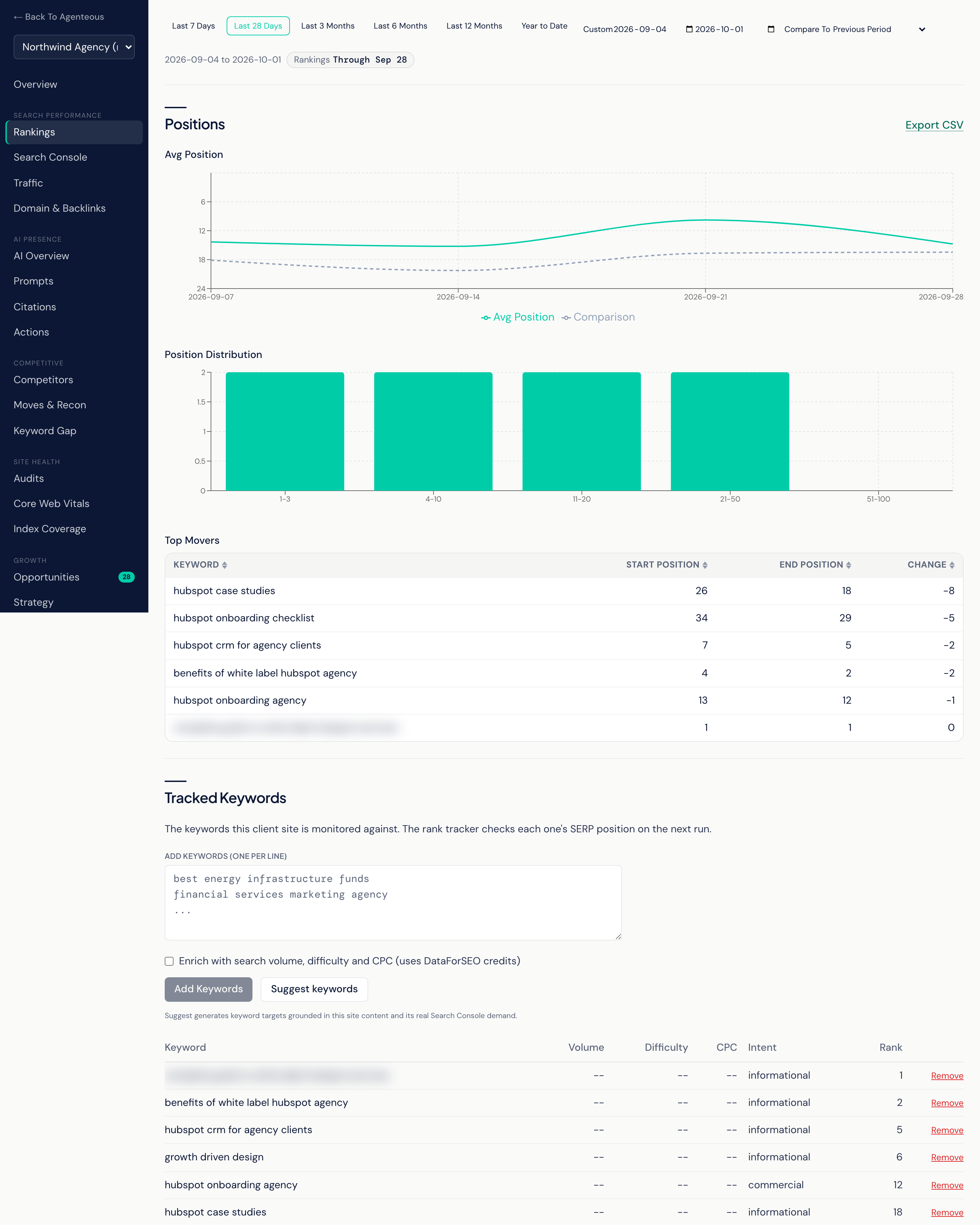
Positions shows the tracked keywords' search positions over the chosen range:
- Avg Position: the average position over time. The chart is drawn upside down so that a line going up means rankings are improving.
- Position Distribution: how many keywords sit in each position band.
- Top Movers: the keywords that moved most, with Start Position, End Position and Change.
- Export CSV downloads the rankings for the range.
Tracked Keywords is the list the rank tracker checks. Each row shows the Keyword, its Volume, Difficulty, CPC, Intent and current Rank.
- Add keywords: type one keyword per line and select Add Keywords. Tick the enrich option to pull search volume, difficulty and CPC for them; enriching uses your DataForSEO credits. New keywords get a position on the rank tracker's next run, not instantly.
- Suggest keywords: generates keyword targets from the site's own content and its real Search Console demand, and adds them straight to the tracked list. There is no separate approval step, so remove any you do not want.
- Remove: takes a keyword off the list right away.
The Keyword Cap you set when adding the site is how many tracked keywords the rank tracker checks on each run. Keywords beyond the cap stay on the list but are not checked.
Past Keyword Analyses lists the last ten keyword analyses for the site. Open one for the full breakdown. New Analysis opens a keyword research form: give a Target Keyword and, optionally, Supporting Keywords, a Search Intent and an Audience. The analysis surfaces long-tail terms and related questions and ranks its recommendations by intent and content shape. It is advice for you to read; it does not change the tracked list.
Search Console
What Google Search Console reports for the site over the chosen range:
- Clicks, Impressions and CTR, each as a headline number with its change against the comparison period and a trend chart.
- Top Queries and Top Pages, each with clicks, impressions and CTR.
- Export CSV downloads the Search Console rows.
This view needs a Search Console property on the client site. Without one there is no history to show. If the chosen window has no data you see "No Data for This Range"; try a wider range or a different comparison.
Traffic
What Google Analytics (GA4) reports for the site over the chosen range:
- Sessions, Active Users and Conversions, each as a headline number with its change and a trend chart.
- Channel Mix: sessions split by traffic channel.
This view needs a GA4 property id on the client site. Once one is added, the next monitor sweep fills in traffic and conversion history.
Domain & Backlinks
Domain-level measures over the chosen range, each as a headline number with its change and a trend chart: Organic Keywords, Organic Traffic (an estimate), Backlinks and Referring Domains. These come from domain snapshots the monitor collects through your DataForSEO account about once a month by default, or straight away when you select Refresh Now on the Overview. The view is read-only.
Who Uses It
- SEO specialists: manage the tracked keyword list and read ranking movement.
- Content leads: see which queries and pages already earn clicks.
- Account managers: pull a CSV or a trend for a client conversation.
Related
- Visibility Overview
- Competitive: the keywords competitors rank for that this site does not.
- Growth and Reports: opportunities mined from Search Console.
- Marketing SEO
- DataForSEO