AI Presence
When a buyer asks an AI assistant a question like "best marketing agency for B2B SaaS", the client's brand either comes up in the answer or it does not. The AI Presence group in the Visibility workspace rail measures that, for the client site you pick, across four views: AI Overview, Prompts, Citations and Actions.
What It's For
Use these views to see how visible a brand is in AI answer engines, where that visibility comes from, and what to do about the gaps. Prompts is the control that matters most: it is the list of questions the weekly visibility monitor asks each AI engine, so anything not on it is never measured. The other three views read and act on what that monitor collects.
How the Measuring Works
Every Monday morning the visibility monitor asks each configured AI engine every active prompt for the brand, records whether the brand was mentioned and where, and keeps the sources the answer cited. Brand Presence for an engine is the share of tracked prompts whose answer mentioned the brand. The monitor posts mentions gained and lost since its last run to the Marketing SEO agent's Slack channel, and only when something changed.
AI Overview
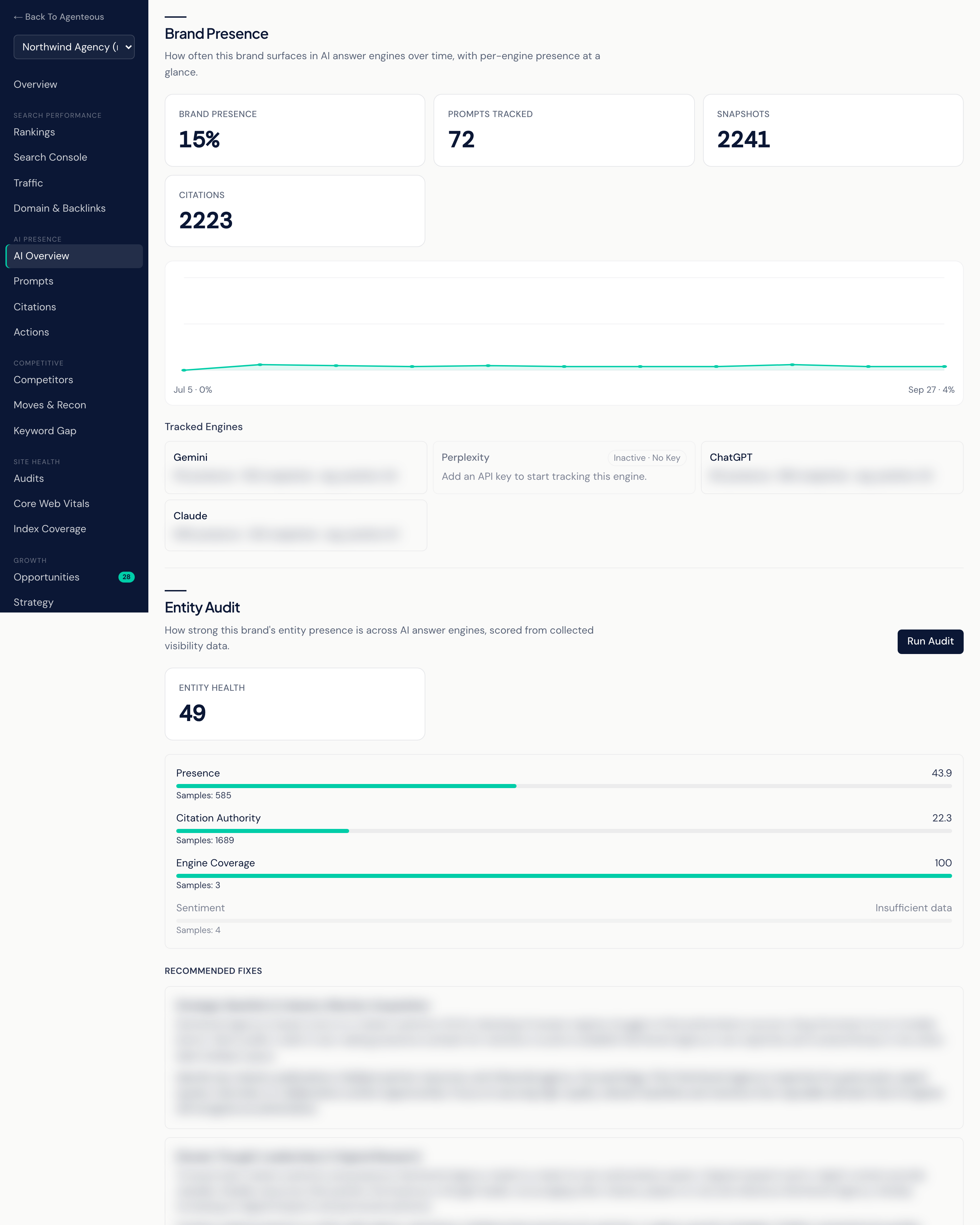
Brand Presence shows four headline counts: Brand Presence (as a percentage), Prompts Tracked, Snapshots (answers collected) and Citations. A trend line below shows presence over the last 90 days.
Tracked Engines has one card per AI engine, showing its presence, how many snapshots it has, and the brand's average position in its answers. An engine that has no API key yet shows an Inactive · No Key badge and a dimmed card, so you can tell "not connected" apart from "the brand scored zero there". Until the monitor has run, the panel reads "Presence tracking will appear here once the visibility monitor has run."
Entity Audit gives the brand one Entity Health score out of 100, built from four parts, each scored out of 100:
| Part | What it measures | Weight |
|---|---|---|
| Presence | How often the brand is mentioned across tracked answers | 40 |
| Citation Authority | The share of citations that come from commercial, editorial or institutional sources | 30 |
| Engine Coverage | The share of engines where the brand appears at least once | 20 |
| Sentiment | How favorably the answers describe the brand | 10 |
The health score is the weighted average of the parts that have enough data. A part without enough data shows "Insufficient data" and is left out of the average rather than counted as zero, so the score can move when a part starts reporting. Below the score, Recommended Fixes lists the top fixes, each with the reason and what to do. Run Audit computes a fresh score and fix list from data already collected; it does not run new engine checks.
Past Answer-Engine Checks lists the last ten one-off answer-engine checks. New Analysis opens a form that asks today's answer engines about the brand and grades how well it shows up. You can give your own questions (one per line) or let the analyst write between 2 and 10 representative ones, and you can override the brand name used in the questions. Open a check for its per-question results and gap recommendations.
Prompts
The list of questions the weekly monitor runs. Two counters sit at the top: Active Prompts (what the monitor runs right now) and Linked to Pillars (active prompts mapped to a content pillar).
- Add a Prompt: type a question a buyer might ask, with an optional category, and select Add Prompt. A prompt already on the list is refused with "Already Tracked".
- Active / Inactive: switch a prompt off to stop the monitor asking it without losing it. Show Inactive brings switched-off prompts back into view.
- Edit, then Save or Cancel: change a prompt's wording or category.
- Pillar: link the prompt to one of your content pillars, so visibility you earn maps back to your strategy. Suggest proposes a pillar and shows how confident it is; you confirm the choice.
- Delete: removes the prompt for good.
Suggested Prompts lists AI-generated prompt ideas drawn from visibility gaps and trends. Accept adds one to the tracked list, Dismiss discards it, and Accept All takes the lot. Each Monday morning the pending suggestions are also posted to the Marketing SEO agent's Slack channel with the same buttons.
Prompt Rankings, below the list, shows the brand's tracked keywords with their latest search Position, Search Volume, Target URL and when each was Updated. A keyword with no position reads "Unranked".
Citations
Which sources AI engines cite when they answer the tracked prompts, over the last 90 days:
- Total Citations.
- By Source Type: citations split into commercial, editorial, competitor, institutional and unknown sources. The client's own domain counts as commercial.
- By Engine: which engines cite most.
- Top Cited Domains: the sites that get cited most often.
Read this view to learn where credibility in the client's space comes from, and which sites are worth earning a mention on. It shows "No Citations Yet" until the monitor captures answers that link to sources.
Actions
A prioritized to-do list for winning visibility on prompts where the brand is missing. Select Generate Actions and the product gathers the current gaps: each prompt where the brand was absent from one or more engines, with the competitors that appeared instead. Prompts that already have an open action are skipped. A reasoning model then turns each gap into a concrete action and places it in a bucket:
- Do Now
- Quick Win
- Plan
- Deprioritize
Each action shows what to do, why, and, when there is one, the page it applies to. After generating you see how many new actions were added, or "No new gaps to act on right now."
Mark Done and Dismiss take an action off the open list. Actions are advice only: nothing is published or sent from this view.
Who Uses It
- SEO and content leads: curate the prompt list and work the action list.
- Strategists: link prompts to content pillars and spot where competitors win.
- Account managers: explain a client's AI visibility with the presence trend and entity score.
Related
- Visibility Overview
- Competitive
- Growth and Reports: the monthly report includes AI presence.
- Pillars
- Marketing SEO
- AI Visibility settings in the Operator Console