Site Health
The Site Health group in the Visibility workspace rail covers the technical side of a client site: whether it crawls cleanly, how fast its key pages load, and whether Google has indexed them. It has three views: Audits, Core Web Vitals and Index Coverage.
What It's For
Use these views to catch technical problems that hold a site back in search before they cost rankings. Site audits and vitals checks run on the weekly SEO sweep, and you can run vitals, index and on-page checks yourself whenever you need a fresh read. Pick the client site in the rail first. If a view shows "SEO Lens Off For This Client Site", SEO tracking is off for that site and the view shows no data.
Audits
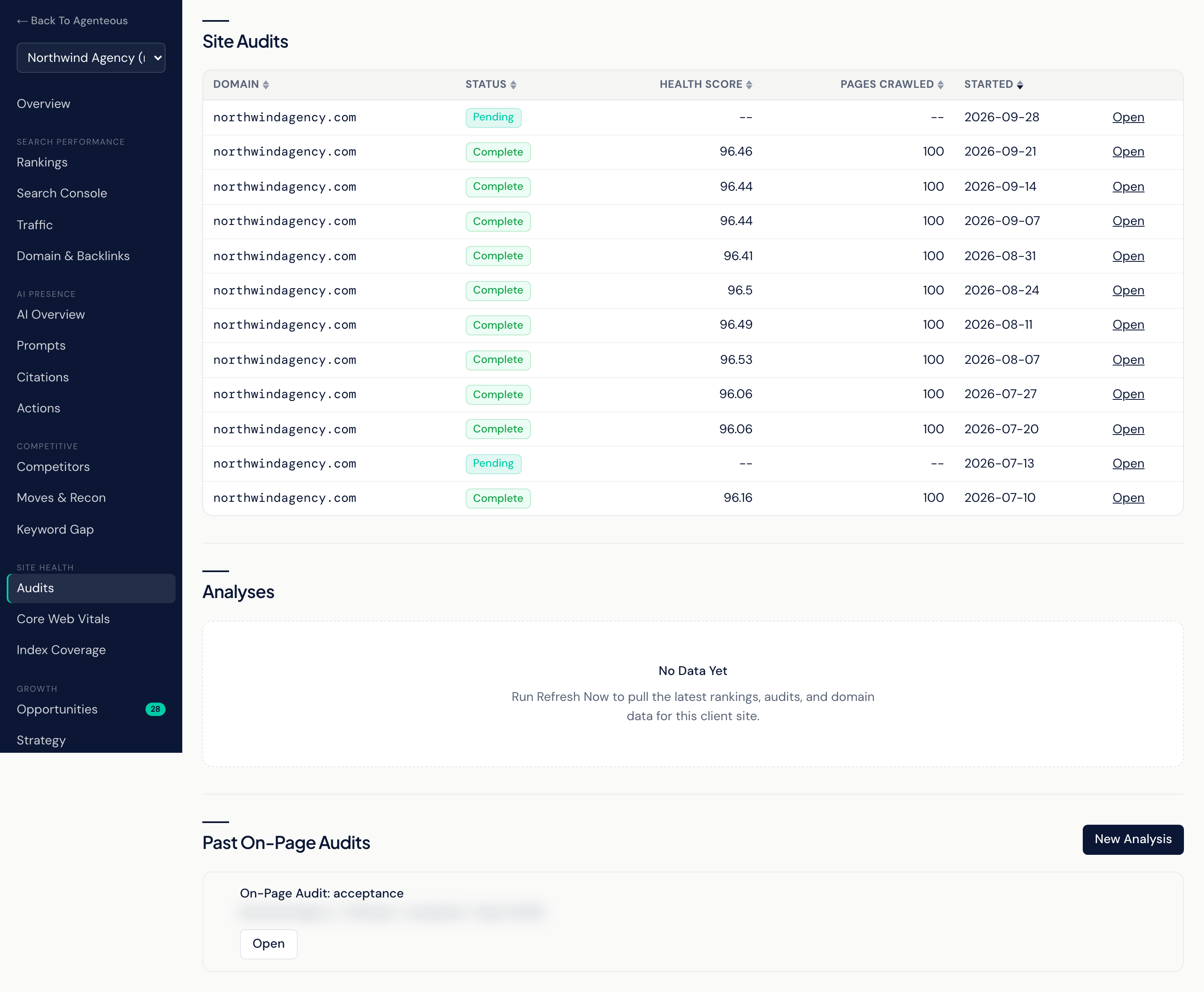
Site Audits lists the crawls of the client site, with the Domain, Status, Health Score, Pages Crawled and when it Started. Select Open on a row for the audit's issues, grouped by severity from critical and error down through warning, info and notice. Site audits run on the weekly SEO sweep, or straight away when you select Refresh Now on the Visibility Overview; this view has no button of its own to start one.
Analyses lists data pulls run for the site, such as keyword overviews, domain comparisons and backlink gaps, with the Analysis Type, Status and when it was Created. Select Open for the full rows.
Past On-Page Audits lists the last ten on-page audits. Each shows its target keyword and a score with a verdict: Ship at 80 or above, Revise at 60 to 79, and Blocker below 60. New Analysis opens an on-page audit form. Audit a Live URL or a Pasted draft, and optionally give a Target Keyword, a Target Length in words, and an Audience. The audit scores keyword presence, header structure, word count, readability and search fit, and lists the highest-value revisions. Leave the target keyword blank to score structure only. Auditing a draft lets you check a page before it is published.
Core Web Vitals
Lab performance results for the site's top pages, measured for both mobile and desktop. The pages checked are the site's highest-click pages in Search Console, up to eight of them.
Each row shows the URL, the Strategy (mobile or desktop), the performance Score, and LCP, CLS, INP and TTFB, with when it was Checked. Scores follow Google's PageSpeed bands: 90 and above is good, 50 to 89 needs improvement, and below 50 is poor.
Vitals run automatically once a week. Check Vitals runs a fresh check now. Until the first check the view reads "No Vitals Checks Yet".
Index Coverage
Whether Google has indexed the site's top pages, using Google's URL Inspection results. Each row shows the URL, the Verdict (Indexed, Not Indexed or Other), the Coverage State Google reports, the Last Crawl date, and when it was Checked.
Check Index Status runs an on-demand check against the site's top 20 pages. Until the first check the view reads "No Index Checks Yet". This check relies on the site's Search Console property.
Who Uses It
- SEO specialists: work through audit issues and pages that are not indexed.
- Web developers: use the vitals results to find slow pages.
- Content leads: audit a draft against its target keyword before it goes live.
Related
- Visibility Overview
- Search Performance
- Growth and Reports: the Strategy gameplan draws on the site audit.
- Marketing SEO
- Marketing Web