Competitive
The Competitive group in the Visibility workspace rail is where you keep a client site's competitors and see what they are doing. It has three views: Competitors (the roster), Moves & Recon (what competitors changed or published), and Keyword Gap (the searches they win and the client does not).
What It's For
Use these views to decide who the client is really up against, keep an eye on their moves, and find the searches where they are winning. You add and archive competitors on the roster; everything else is gathered for you by the competitor watches and the weekly SEO sweep. Pick the client site in the rail first.
Competitors
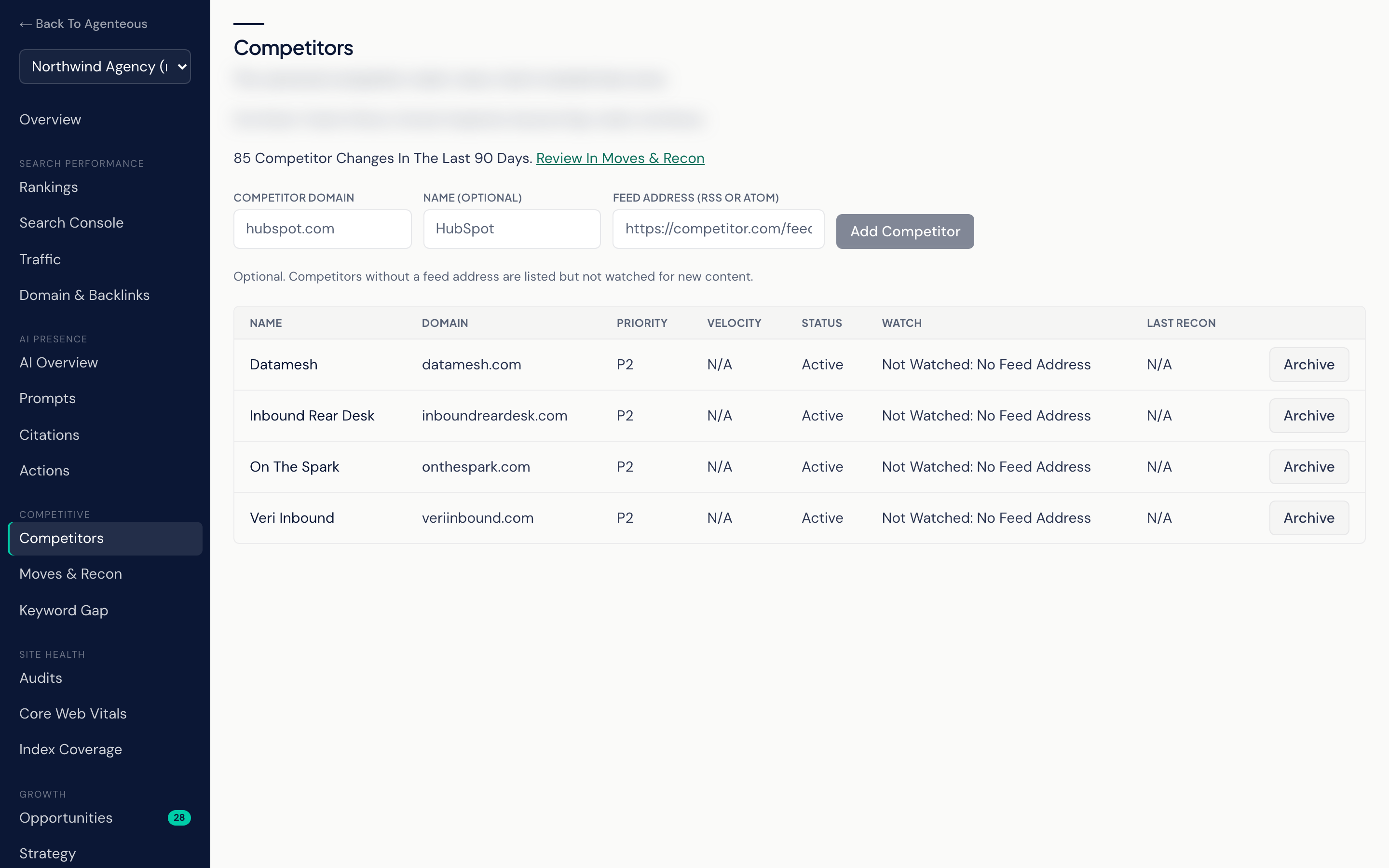
The canonical competitor roster for the selected client site. It feeds the keyword gap, domain snapshots and audits. Competitors you track under Moves & Recon are added to it automatically, and adding one here also creates its Competitor Intel entry. A competitor is watched for moves once it has a feed address.
- Add Competitor: enter a Competitor Domain and, optionally, a Name and a Feed Address (RSS Or Atom). Competitors without a feed address are listed but not watched for new content.
- Archive: takes a competitor off the roster. It is archived, not deleted.
Each row shows the competitor's Name, Domain, Priority, Velocity, Status, Watch and Last Recon. Velocity and Last Recon come from the intel watch. Watch reads Watching, Paused or "Not Watched: No Feed Address"; for a competitor that is not watched, Velocity and Last Recon read N/A. The moves themselves are on the Competitor Intel list under Moves & Recon.
When the recon watch has detected changes in the last 90 days, a line above the table counts them, with Review In Moves & Recon.
Moves & Recon
Two sections:
Competitor Changes lists the content changes the recon watch has detected across the roster. Each day the watch checks the competitors' watched pages that are due (each page has its own check interval, weekly unless set otherwise), compares the visible text with the last copy it kept, and has a model judge each change: what kind of change it is, how urgent it is, and how significant on a scale of 1 to 10. Each card shows the competitor, the change type, its urgency, its significance, when it was detected, a short summary and a recommended response. Critical and high-urgency changes are also posted to the Marketing SEO agent's Slack channel.
Acknowledge marks a change as seen. It has no other effect.
Competitor Intel is the watchlist behind the moves. Add a rival with a Competitor Domain, an optional Name, an optional Feed Address (RSS Or Atom), and Track. The table shows each competitor's Priority, Velocity and Status; a competitor with no feed address shows "Not Watched: No Feed Address" as its status. Velocity is how many moves the competitor made in the last 30 days, so a high number means a rival is publishing or changing a lot. Every six hours the intel watch reads the published feed of each active competitor that has one, classifies each new entry as a kind of move, and records it. A competitor added without a feed address, whether with Track or from the roster, is listed but not watched, so it shows no moves.
Open a competitor's name for its detail page:
- The header shows its domain, priority, velocity and status.
- Pause Watching stops the intel watch from checking that competitor; Resume Watching starts it again.
- Recent Moves lists what the competitor published, each with its kind, a link and a summary.
- Queue Topic turns a move into a "Respond to" topic in your Content Queue. It adds an idea to the queue; nothing is drafted or published. Once queued, the move shows Queued, which opens the Content Queue.
Keyword Gap
Keywords your roster competitors rank for that this site does not, plus how organic search traffic is shared among them. A freshness chip shows when the keyword data was captured.
- Share Of Voice: each domain's share of the estimated organic traffic across this site and its tracked competitors. The client site is tagged This Site.
- Share Of Voice Trend: how those shares have moved across past captures.
- Keyword Gap: keywords where a competitor ranks in the top 20 and this site is absent or ranks below 20, sorted by search volume. Columns are Keyword, Volume, CPC, Their Best Rank and Our Rank.
- Head To Head: the top keywords that two or more tracked domains rank for, and where every domain ranks on each. A domain outside the top 20 reads Unranked.
The weekly SEO sweep collects this data. Refresh Keyword Data starts a pull now through your DataForSEO account; it runs in the background, so check back shortly. Until the first pull finishes the view reads "No Keyword Data Yet". If the view shows "SEO Lens Off For This Client Site", SEO tracking is off for that site.
Who Uses It
- Strategists and SEO leads: keep the roster honest and find keyword gaps worth closing.
- Content leads: turn competitor moves into content topics.
- Account managers: brief a client on what their competitors have been doing.
Related
- Visibility Overview
- AI Presence: which competitors appear in AI answers.
- Growth and Reports: keyword gaps also appear in the Priority Feed.
- Content Queue and Networks
- Marketing Competitor Intelligence
- DataForSEO