Content Queue and Networks
The Content Queue is the running list of specific content ideas for a brand, each moving from a raw idea toward a published piece. Content Networks take one pillar topic and plan a coordinated set of pieces across channels, adding every piece to the queue. Both are planning tools: neither writes a draft or publishes anything.
What It's For
Use the queue to keep track of what to write next and why. Add ideas, have the queue research them into briefs, link each to a pillar, and mark progress as your team works. Use a content network when one theme deserves a coordinated push across several channels. When a topic is ready to write, start the piece from the matching create workspace: the queue does not hand topics to a writer by itself.
Content Queue
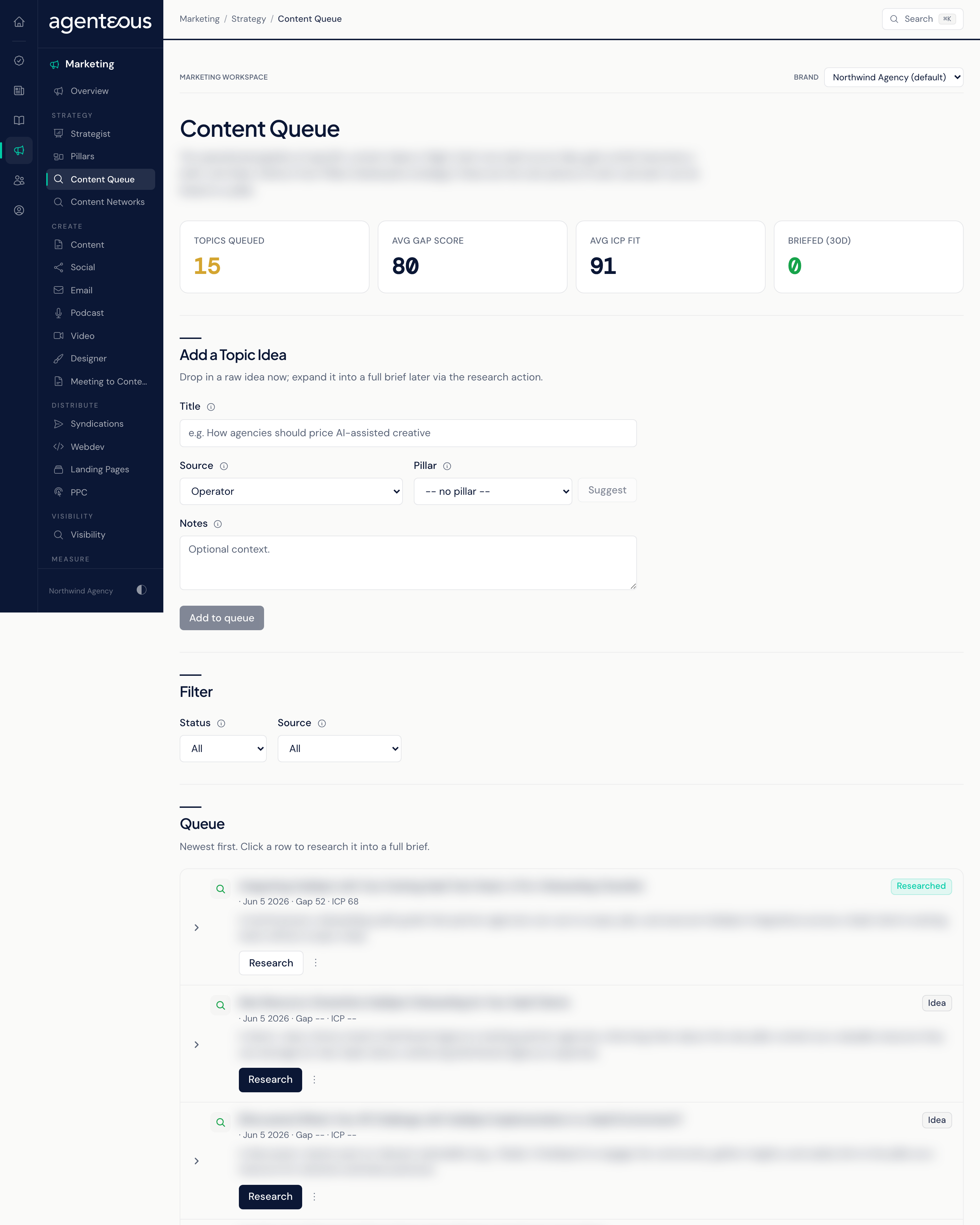
KPI Band
Four counts, each with a hint on what good looks like:
- Topics Queued: ideas still at Idea status. A healthy queue holds 5 to 20 per brand.
- Avg Gap Score: how big the opening is across the queue, from 0 to 100. Topics above 70 are the strongest candidates to write next.
- Avg ICP Fit: how well the queue matches the brand's audience and pillars, from 0 to 100. Below 50 suggests the team is chasing topics that do not fit the brand.
- Briefed (30D): topics marked Briefed in the last 30 days, a measure of how fast ideas become actionable work. Research alone does not count here: a topic counts once someone marks it Briefed.
Add a Topic Idea
Enter a short, specific Title, pick a Source (AI Visibility, Competitor, Customer Question or Operator), and add optional Notes for the writer. You can link a pillar now: choose one, or press Suggest to have one proposed, which you can keep or change. Add to queue saves the idea as a new row. No draft is created.
Filter
Narrow the list by Status (Idea, Researched, Briefed, Written, Published) or by Source. Ideas can also arrive from a campaign plan, a Brand Guard audit or a content network; the Source filter offers only the four sources you can pick yourself.
Queue
The rows, newest first. Each shows the title, where it came from, its status, and its Gap and ICP scores once researched.
- Research expands the idea into a brief: a target keyword, the searcher's intent, the key questions to answer, and the gap and ICP fit scores. It does not write a draft.
- Mark as moves the topic to another status by hand. Research moves a topic to Researched; every other status change is made by hand with Mark as, so keep statuses current as your team works.
- Pillar links the topic to a pillar, with the same Suggest option as the add form. Linked topics appear in that pillar's rollup.
When the queue is empty it reads Queue Is Empty. You can also add an idea by asking the strategist in Slack.
Content Networks
A content network turns one pillar topic into a planned set of pieces across channels, ordered so later pieces build on and link back to earlier ones. The channels a network can use are Blog, LinkedIn, Medium, Reddit and Email.
Plan Network
Press Plan Network, enter a Pillar topic, and optionally choose a Pillar. Plan lays out the pieces, works out which depend on which, and groups them into waves. At that moment every piece is also added to the Content Queue as its own topic. Nothing is drafted or published.
Network Cards
Each network appears as a card with its topic, a status, and a Pieces progress bar counting finished pieces against the total. When there are none yet, the screen reads No Networks Yet. Open a card to see its pieces.
Waves
The network page groups pieces by wave, in order. Each piece shows its channel, its role in the network and its angle. A piece whose earlier waves are not done is marked Blocked: waiting on earlier waves. Open in queue takes you to the Content Queue list, where you can find the piece's topic.
Each piece has a status menu offering Planned, Blocked, Queued, Published and Complete. All five statuses save. A piece marked Blocked is held back and is not offered as ready, even when its earlier waves are done. Progress on the card updates when someone marks a piece Published or Complete here: publishing the matching topic elsewhere does not update the network.
Who Uses It
- Content leads and strategists: decide what gets written next and plan coordinated pushes.
- Writers and channel staff: pick up researched briefs and mark progress.
- Account managers: see the pipeline of ideas for a client brand.