Proof Points
What It's For
Proof Points is the evidence library your writing agents cite: client outcomes, quotes, statistics, and testimonials gathered from your calls and other sources. Each new point arrives as a candidate. You approve or reject it, and only approved points can be used by the agents and the Knowledge Library. This keeps every specific claim in a draft traceable to evidence you have signed off.
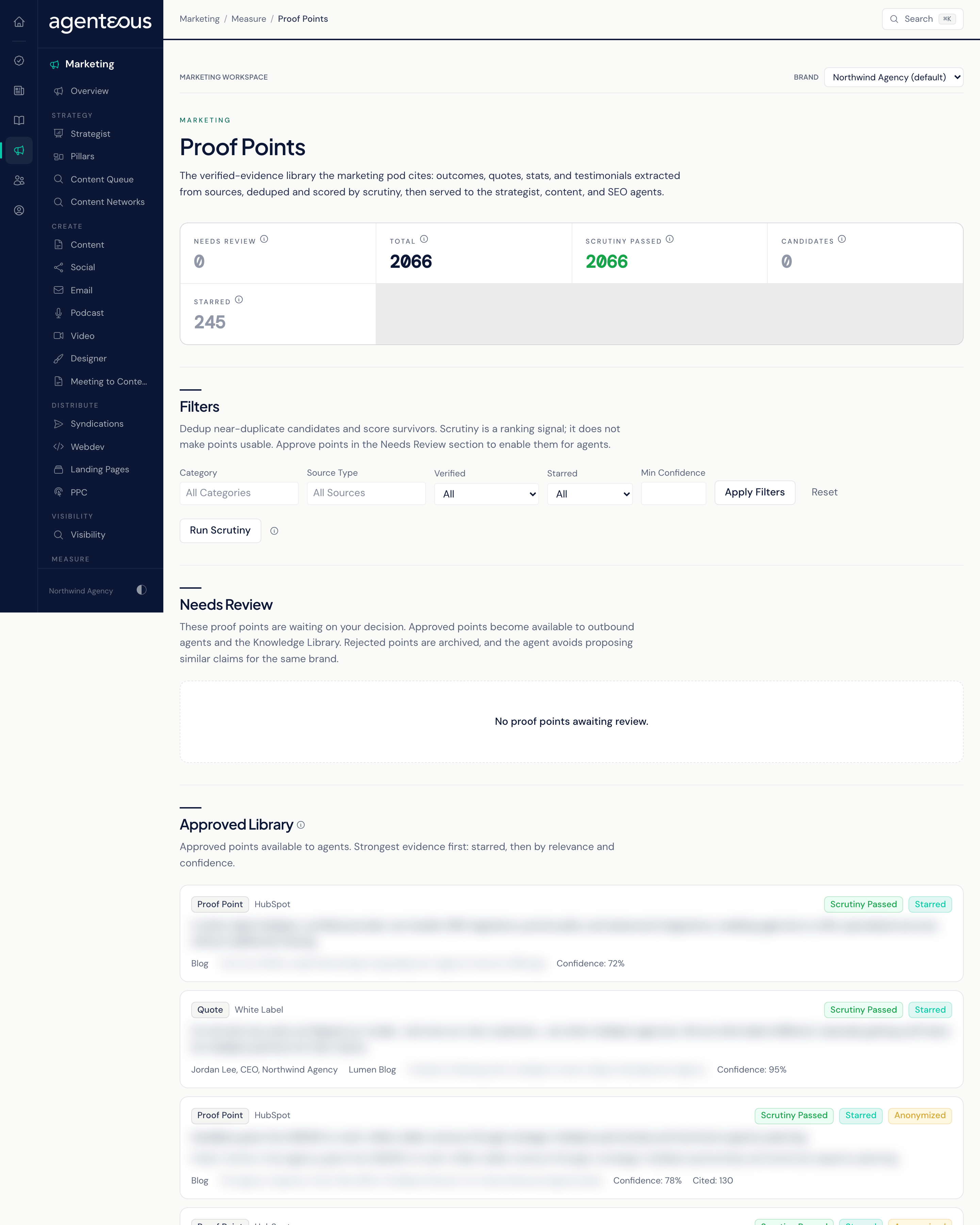
Counts
Five counts sit across the top, all for the selected brand:
- Total: every proof point on file, candidates and approved alike.
- Scrutiny Passed: points that survived the scrutiny pass (see below).
- Candidates: points not yet through scrutiny.
- Starred: hand-picked best evidence, which sorts to the top of the library.
- Needs Review: points waiting for your approve or reject decision.
Run Scrutiny
Run Scrutiny cleans up the candidate pile. It finds near-duplicate points and keeps the strongest one, then scores the survivors. When it finishes, it reports how many points it verified, how many duplicates it removed or demoted, and how many it added to the evidence library.
Scrutiny only affects ranking: a point that passed scrutiny sorts higher, and carries a Scrutiny Passed badge instead of Not Yet Scrutinized. It does not make a point usable. Approval does that.
Needs Review
Points waiting on your decision. Each one shows its type (outcome, quote, stat, or testimonial), its category, the evidence itself, any public-safe version, where it came from, and whether it has passed scrutiny.
- Approve makes the point available to the writing agents and the Knowledge Library.
- Reject, with an optional reason, archives the point. Agents will not use it.
Published testimonials also arrive here as candidates. Publishing a testimonial does not approve it as a proof point: it still needs your approval on this page.
Filters and the Approved Library
Filters narrow the library by Category, Source Type, Verified (All, Verified Only, or Candidates Only; Verified Only means scrutiny passed), Starred, and Min Confidence. Click Apply Filters, or Reset to clear them.
The Approved Library lists the points agents can use, strongest first: starred points, then by relevance and confidence. Each card shows:
- the evidence type and category;
- badges for Scrutiny Passed, Starred, and Anonymized where they apply;
- the evidence, plus its Public Version when the point has been anonymized;
- its Confidence (the scrutiny score) and how often it has been Cited.
Starring is shown here as a badge and a filter; this page has no control to star or unstar a point.
Cited In Your Draft
When a draft was written from proof points, it shows a chip for each one. Selecting a chip opens this page with that exact point at the top under Cited In Your Draft, so you can check the evidence behind a claim before you approve the draft.
Who Uses It
- Content and marketing staff: approve the evidence that drafts may cite, and check a citation before approving a draft.
- Account managers: confirm that client outcomes are described accurately.
- Agency owners and leads: keep the library limited to claims you are willing to stand behind.
Related
- How Drafts Are Grounded in Proof Points
- Testimonials
- Marketing Proof Points
- Knowledge
- Proof Point Library and Testimonials: operator settings and activity for the library.