Account Assistant Monitor
What It's For
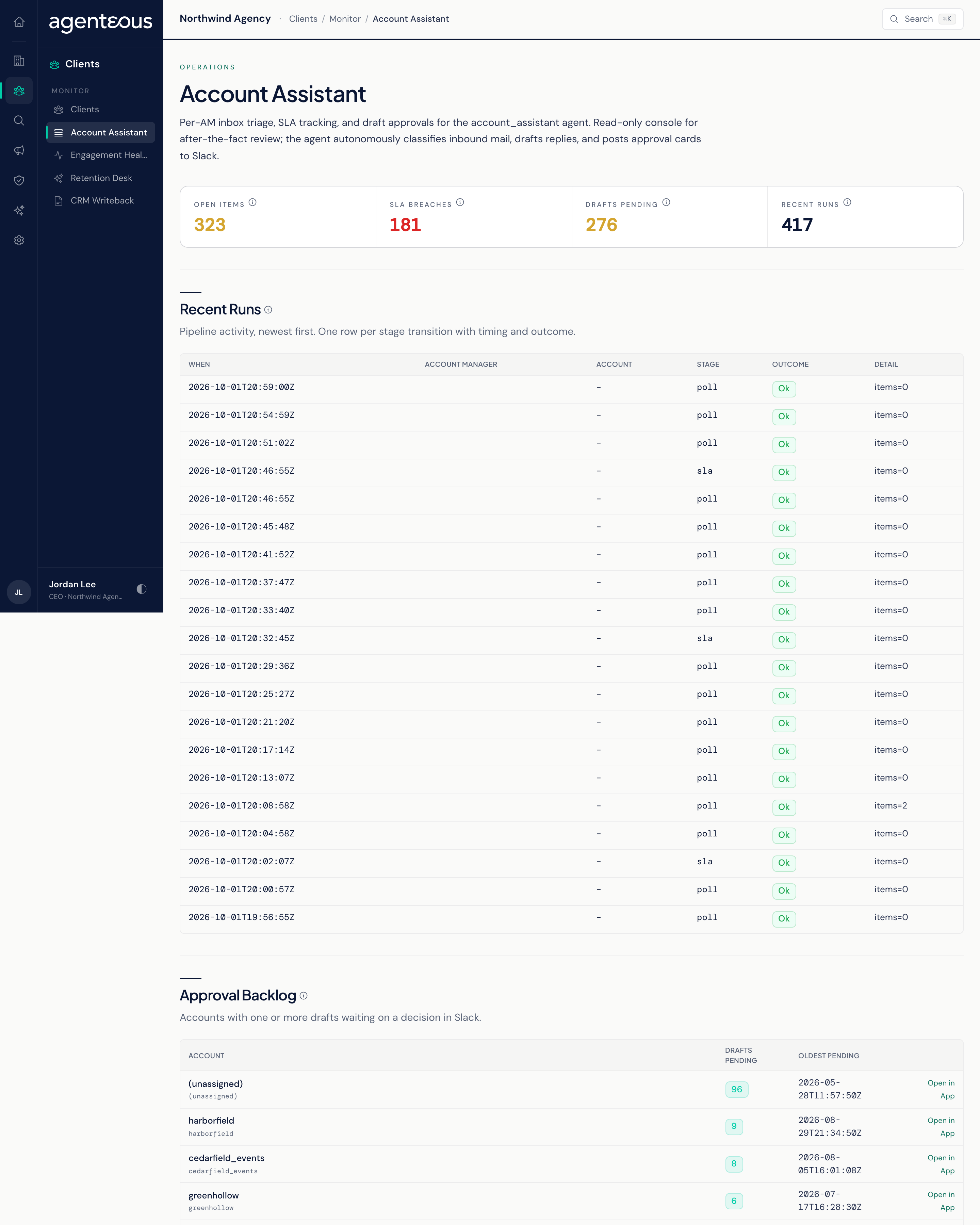
The Account Assistant Monitor is a read-only view of what the Account Assistant has been doing across your account managers' inboxes. It shows how much client mail is open, which replies have missed their response deadline, and which accounts have drafts waiting on a decision. Nothing is configured or approved here. In the Operator Console, under Clients, open Account Assistant.
How the Agent Runs
The Account Assistant checks the connected inboxes every 3 minutes: it reads new threads, decides which ones need a response, and drafts replies for your account managers to review. A separate deadline check runs every 30 minutes and sends the owning account manager a direct message in Slack as a thread reaches each reminder, breach or escalation point on its response deadline.
When an account manager approves a draft, the reply is sent right away from the connected mailbox as a reply-all with the quoted history, and the original message is archived. Rejected drafts are set aside with the reason.
Counters
Four counters sit across the top:
- Open Items: threads that need a response and have no recorded decision yet. Each one either has a draft waiting or is still being drafted.
- SLA Breaches: threads whose response deadline has passed without a recorded reply.
- Drafts Pending: drafts posted for approval that are still waiting on Approve, Edit or Reject.
- Recent Runs: runs of the inbox check (read, classify, draft) in the last 24 hours.
Recent Runs
The last 20 pipeline steps, newest first, one row per step. Columns are When, Account Manager, Account, Stage, Outcome and Detail. Use it to confirm the agent is picking up mail for each account manager and to see where a thread stopped.
Approval Backlog
The accounts that have one or more drafts waiting on a decision, with the most pending first. Columns are Account, Drafts Pending and Oldest Pending. Open in App opens that account in the app in a new tab, where the drafts can be reviewed. When nothing is waiting, the list reads "No drafts are waiting on a decision. Backlog is clear."
If the page cannot read the agent's activity, it shows a notice in place of the counters. Approvals and deadline alerts keep arriving in Slack in the meantime.
Who Uses It
- Admin Operator: the person leading account management chases accounts whose drafts have sat too long and checks deadline breaches across the team.
- Ops Admin: confirms the agent is running for every account manager after a change to inboxes or connections.
- Viewer: a read-only look at client response performance.