Memory Inspector
What It's For
Agents start every conversation fresh, so each one keeps running notes to carry forward what it has learned: preferences, decisions, things to avoid. Memory Inspector lets you read those notes for every agent and search across them. It is a compliance check on what your agents are carrying from one session to the next, and it is read-only.
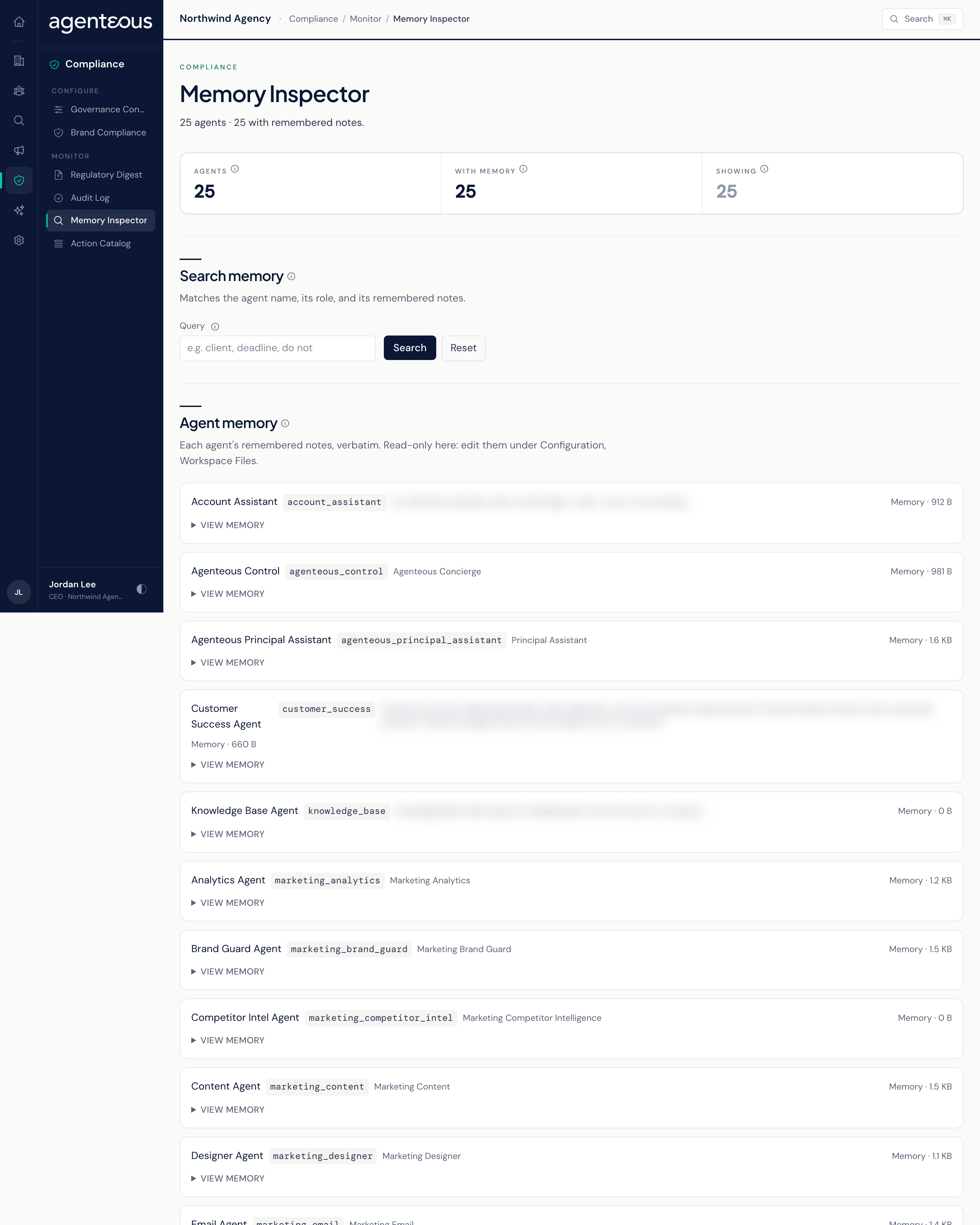
You find it in the Operator Console under Compliance.
Search Memory
Type a word or phrase in Query and click Search. The search looks at each agent's name, its role, and its notes, and ignores capitals. Reset shows every agent again.
Useful searches before a client review: a client's name, a deliverable, or a phrase like "do not publish", to see what the agents are holding on to.
Three tiles sit above the list:
- Agents: how many agents are listed.
- With memory: how many have written at least one note. New agents have nothing until they have something to remember.
- Showing: how many agents match your current search.
Agent Memory
Each agent appears as a row with the size of its notes. Click View memory to expand it and read the notes exactly as the agent wrote them. They are working notes written by the agent, so expect them to be terse. An agent with nothing saved shows "no notes yet".
You cannot change notes here. To edit an agent's notes, open the Operator Console's Workspace Files screen.
Who Uses It
- Compliance officers: confirm agents are not carrying information they should not keep.
- Account managers: check what an agent remembers about a clients before a review.