Marketing Agent Activity
What It's For
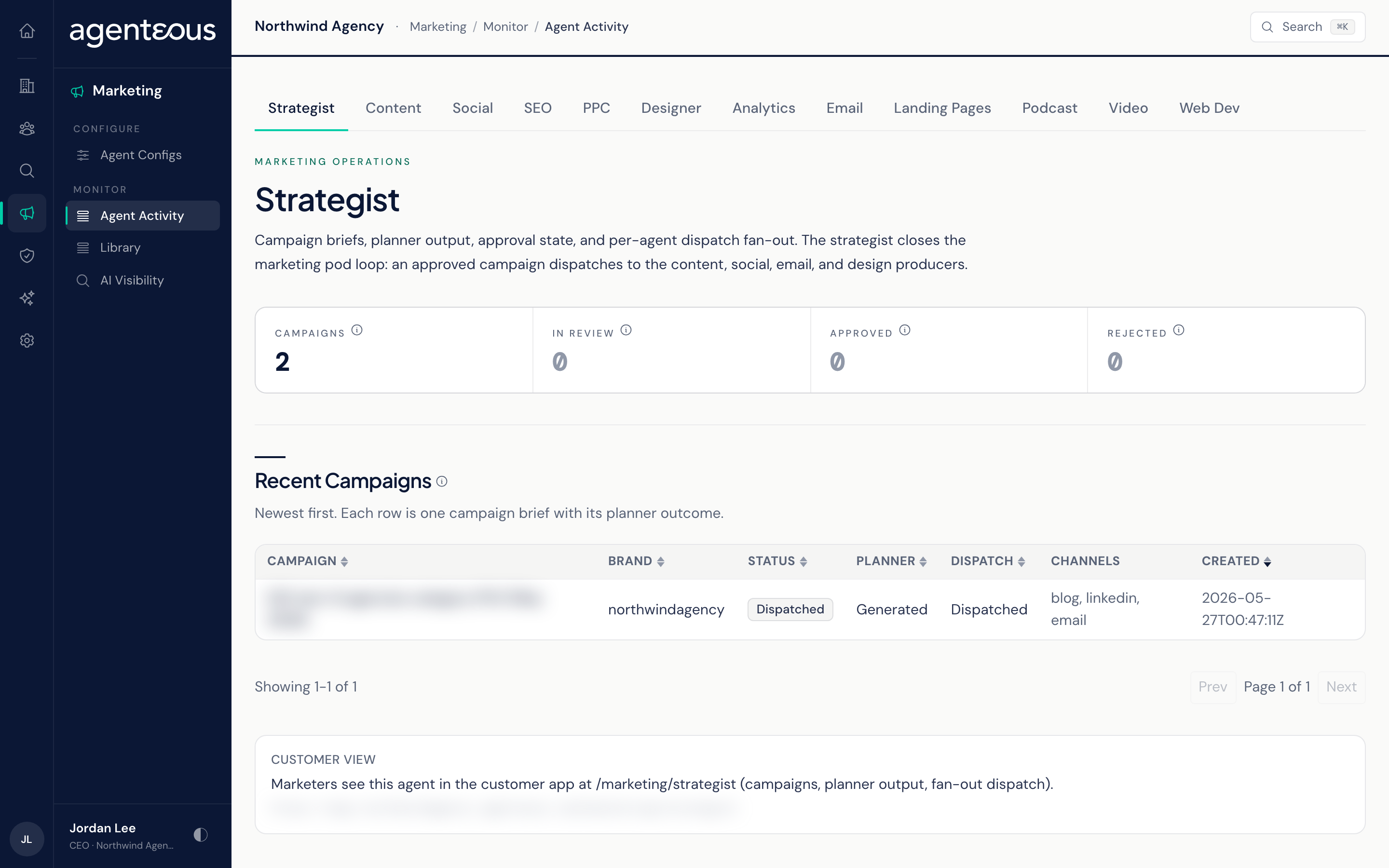
Marketing Agent Activity shows what each marketing agent has produced and where every item stands. It is one screen with twelve tabs, one per agent. Every tab is read-only: you watch the work here, and you approve, edit, or publish it in the app or in Slack.
You find it in the Operator Console under Marketing. The tabs appear only when your install includes the marketing agents add-on.
Every tab has the same layout:
- Four tiles across the top with that agent's headline counts.
- A table of recent items, newest first, 25 to a page. Click a column header to sort the rows on the current page; use the page controls to go further back.
- A Customer view card that opens the matching page in the app, where the team works on these items. The card does not appear if your install has no app address set.
If a tab cannot load its data, you see a short notice instead of the table. Refresh in a moment.
Several tables have a Gate column. It shows the result of the brand compliance check on that item, when the check ran. Whether it runs at all depends on the gate mode set in Brand Compliance.
Strategist
Campaigns from the Marketing Strategist. The tiles count Campaigns, In review (a plan waiting for approval; the Slack card is where most reviews happen), Approved, and Rejected (kept for the record, not retried).
The Recent Campaigns table shows each campaign's name, brand, status, planner result, dispatch result, channels, and creation date. Status is where the campaign is in its life (draft, in review, approved, archived, rejected). Dispatch is what happened when the approved plan was handed to the other agents. If the table is empty, start the first campaign from Slack with the strategist command.
Content
Long-form posts from Marketing Content. The tiles count Posts, In review, Scheduled (approved and waiting for their publish time), and Published (live on your blog platform).
The Recent Posts table shows each post's outline and draft progress, its SEO score, its Gate result, and its publishing state. This is the one tab where rows open: click a post to see a preview of the draft, its SEO, GEO, AEO, E-E-A-T, and FAQ scores as bars (green from 75, amber from 60, red below), its title and meta fields, and its SEO brief. The Copy as HTML and Copy Meta Tags buttons copy text to your clipboard; nothing is published from here.
Social
LinkedIn drafts from Marketing Social, in both company voice and staff voice. The tiles count Drafts, In review, Scheduled, and Published.
The Recent LinkedIn Drafts table shows each draft's brand, voice, format, status, Gate result, and scheduled time. An approved draft with a scheduled time publishes automatically when that time arrives.
SEO
On-request analyses from Marketing SEO, in three separate tables that page independently. The tiles count Keyword analyses, On-page audits, AEO/GEO checks, and Total runs.
- Recent Keyword Analyses: the target keyword, brand, search intent, audience, and how long the run took. Degraded marks a run where the keyword data source returned nothing and the analysis was written without it.
- Recent On-Page Audits: the page or topic, its keyword, a 0 to 100 score, and the verdict that score earns: ship, revise, or blocker. The score combines fixed checks with a judged review of readability, expertise, and audience fit.
- Recent AEO/GEO Checks: the engines queried and the answer-engine, generative-engine, expertise, and combined scores.
The score floor for on-page audits is set on the SEO tab of Marketing Agent Configs.
PPC
Paid-search analyses from Marketing PPC. Nothing is pushed to an ad platform from this agent. The tiles count Campaign analyses, Ad-copy reviews, Budget recommendations, and Total runs, and each has its own table:
- Recent Campaign Analyses: the window and data source analysed.
- Recent Ad-Copy Reviews: the headline, platform, keyword, combined score, verdict, and Gate result.
- Recent Budget Recommendations: the monthly cap and the return on ad spend before and projected.
Designer
Images from Marketing Designer. The tiles count Generations, Attached (used on a content post), Unattached (finished but not attached to anything), and Degraded (no usable image came back, for example because the image service declined the prompt or timed out).
The Recent Generations table shows the image prompt, brand, size, provider, status (queued, generating, complete, degraded), and whether it is attached.
Analytics
A cross-agent rollup from Marketing Analytics, which only reads the other agents' records and never changes anything. The tiles count the Producers it follows, how many are Available (reported data for the window), how many are Unavailable, and Recent items.
The Producer Roster lists each producing agent with its headline number or the reason it has no data. Recent Activity is a combined feed of the newest items across all of them. This tab always covers the last 7 days; there is no window control here.
Marketing email drafts from Marketing Email. The tiles count Drafts, In review, Scheduled, and Sent.
The Recent Drafts table shows the topic, brand, subject, status, whether recipients are assigned, the Gate result, and the sending service. Approving an email marks it approved; sending is a separate step. Sending campaigns is off unless your agency has turned outbound email on, so while it is off, approved emails are not transmitted and Sent does not grow. With the brand compliance gate Off or Warn, the check never holds an approved email back; only Enforce does (see Brand Compliance).
Landing Pages
HubSpot assets, mostly landing pages, from Marketing Landing Pages. The tiles count Assets, In review, Published, and Failed (HubSpot returned an error on publish).
The Recent Assets table shows the topic, brand, kind, copy state, status, Gate result, and the HubSpot record it created. Approving an asset does not publish it. Publishing to HubSpot is a separate step in the app, and it creates a HubSpot draft unless you choose to push it live. With the brand compliance gate Off or Warn, the check never holds an approved asset back; only Enforce does (see Brand Compliance). The agent does nothing when HubSpot is not connected.
Podcast
Episodes from Marketing Podcast moving through planning, audio, transcription, clip suggestions, and show notes. The tiles count Episodes, In review (an episode can be approved once its plan, transcript, and show notes are all done), Drafts (mid-way through), and Published.
The Recent Episodes table shows each episode's topic, brand, episode number, guest, plan and transcript state, and status.
Video
Short-form video projects from Marketing Video, through script, storyboard, and render. The tiles count Projects, In review, Drafts, and Published.
The table shows each project's duration, aspect ratio, script and storyboard state, status, and the Gate result on the script.
Web Dev
Landing pages from Marketing Web. The tiles count Pages, In review (the compliance check runs on the page brief), Drafts, and Published.
The table shows each page's kind, brief and render state, status, and Gate result.
Who Uses It
- Marketing leads and account managers: see what each agent has produced this week and what is still waiting for review.
- Operations administrators: spot an agent whose output has stalled or keeps failing the compliance check.