Voice Outreach Setup
What It's For
Voice Outreach holds the settings for AI voice calls to prospects. In the Operator Console, under Sales & Meetings, open Voice Outreach. The page sets who the AI caller says it is, when it may call, how hard it may push and which call types it runs. It is setup only: saving it never places a call. Calls are placed only once dialing is turned on for your agency, and, while Require Approval Before Each Call is on, only after a person approves each one in the app.
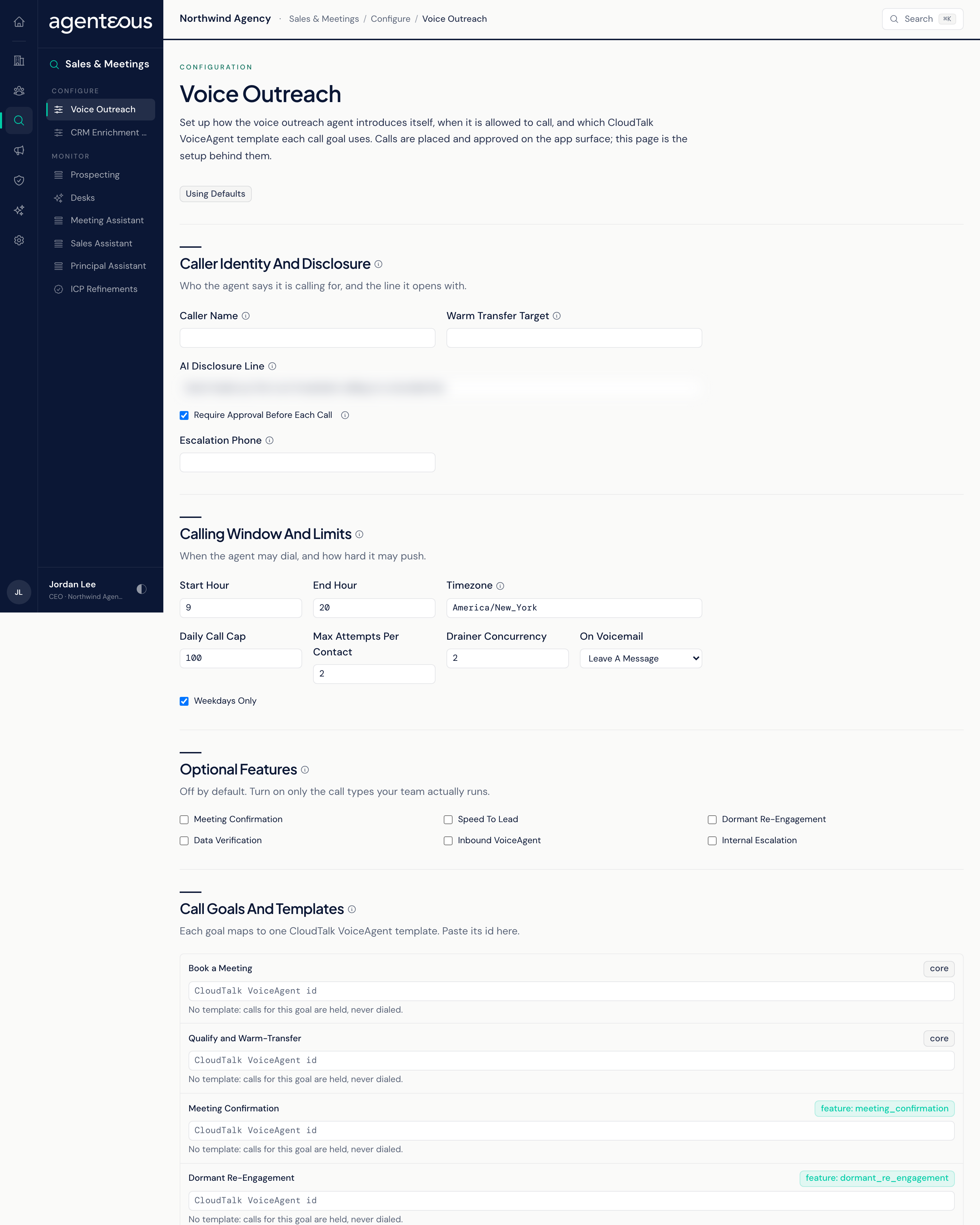
Voice Outreach Setup
The setup page for the Voice Outreach agent. Calls are queued and approved in the app's Voice Calls screen.
Saving this page never places a call. Dialing is a separate switch for your whole agency, and it is off by default. Until it is turned on, no calls are placed, whatever you set here.
Caller Identity And Disclosure
- Caller Name: the person the AI says it is calling on behalf of. It always comes from this field.
- AI Disclosure Line: spoken near the start of every call. The caller must identify itself as AI on a recorded line, and each completed call is checked against this line. The default is "Quick heads up: this is an AI assistant calling on a recorded line."
- Warm Transfer Target: the CloudTalk agent or ring group a qualified call is handed to.
- Escalation Phone: the fallback number for internal escalation calls when no team member is set to receive them.
- Require Approval Before Each Call: on by default. When on, every call brief waits for a person to approve it before anything is dialed. When off, a queued call goes ahead without that click, and the person who queued it is recorded as having approved it. The Do Not Call list, the calling window, the outbound switch and the audit record still apply either way.
Calling Window And Limits
- Start Hour, End Hour and Timezone: when calls may be placed, in the timezone you choose (default 9am to 8pm, America/New_York). A call that falls outside the window is held and retried later, not failed.
- Weekdays Only: on by default.
- Daily Call Cap: the most calls placed in a day (default 100), counted from midnight UTC. It applies to every call, including one approved during calling hours. A call over the cap stays queued with its approval and is placed the next day; it is not dropped.
- Max Attempts Per Contact: default 2.
- Drainer Concurrency: how many calls may be worked on at once (default 2).
- On Voicemail: Leave A Message (default) or Hang Up.
Optional Features
Extra call types beyond the two core goals, each off by default: Meeting Confirmation, Speed To Lead, Dormant Re-Engagement, Data Verification, Inbound VoiceAgent and Internal Escalation. A call type whose feature is off is never queued. Turning one on does not make it callable by itself: it also needs a template below.
Call Goals And Templates
Each call goal maps to one CloudTalk VoiceAgent, which you build in your CloudTalk account. Paste the VoiceAgent's id against the goal. Core goals carry a core badge; others show the feature they belong to. A goal with no id shows "No template: calls for this goal are held, never dialed." That is the intended safety net.
Click Save Configuration to apply. A badge reads Configured or Using Defaults.
Who Uses It
- Agency owners: decide whether AI calling is right for your agency.
- Sales leads: set the calling window and the call types your team runs.
- Saving this page needs the Ops Admin, Admin Operator or CCO role.