Inbox Triage
What It's For
Inbox Triage holds every switch the Principal Assistant reads when it sorts the principal's Gmail inbox: how far it may act, which folders it may file into, where suspected junk goes, what it learns from you, and who is never filed away. In the Operator Console, under Agency, open Inbox Triage. Changes take effect on the next check of the inbox, with no restart. Nothing on this page can delete mail: the strongest action is moving a message to the review folder, and you can always move it back.
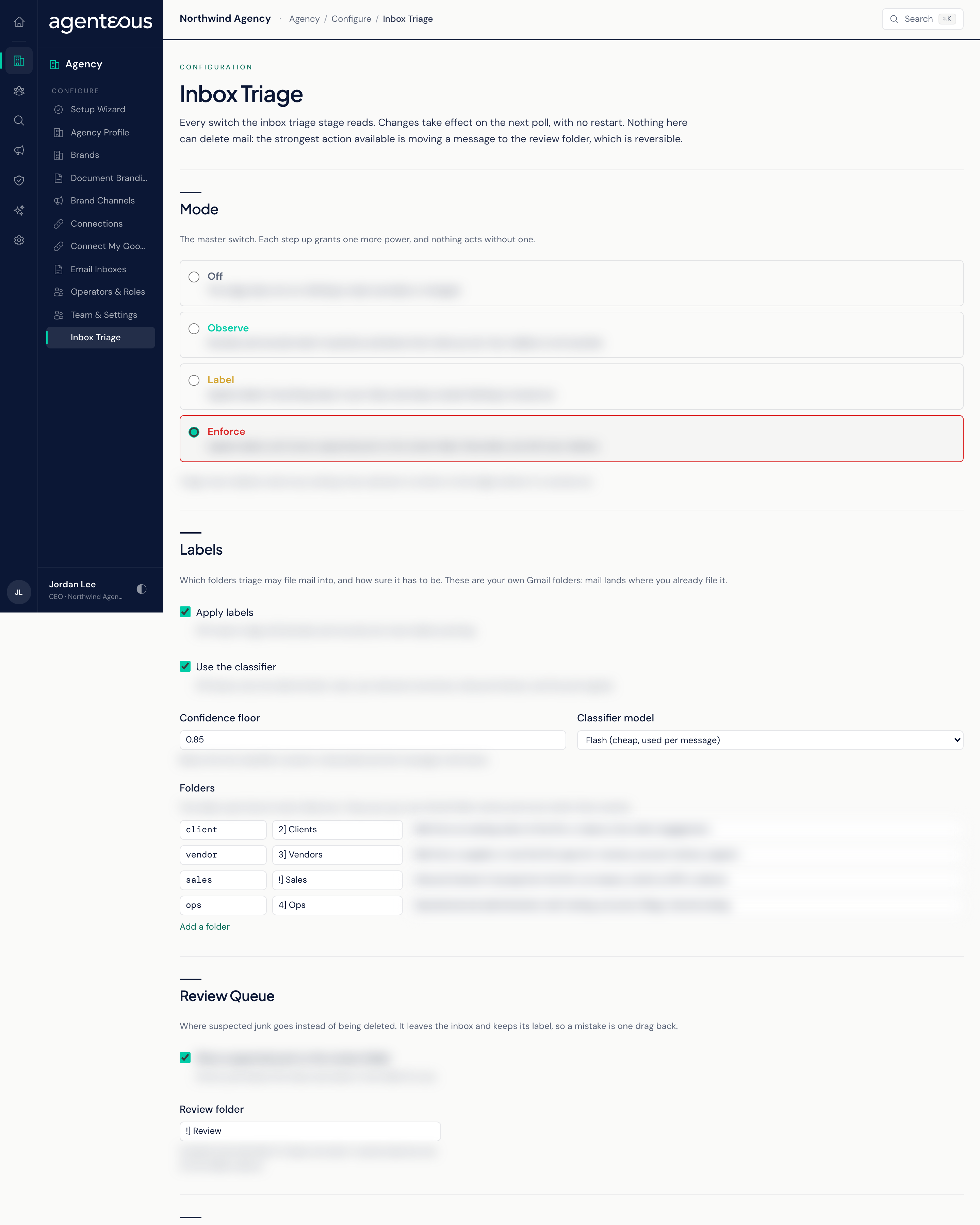
Mode
The master switch. Each step grants one more power:
- Off: triage does not run. Nothing is read, recorded or changed.
- Observe: triage decides and records what it would do, and learns from what you do. Your mailbox is not touched.
- Label: applies labels. Everything stays in your inbox and stays unread.
- Enforce: applies labels and moves suspected junk to the review folder. Still never deletes.
Every action needs both the right mode and its own switch further down the page. Labelling works in Label or Enforce; moving junk to review and acting on learned archive rules work only in Enforce. The product ships with a triage policy already in place, set to Observe: once the principal's Gmail is connected, triage decides and records what it would do but touches nothing. The shipped labels are neutral starting names (Clients, Vendors, Sales, Ops, and Review for the review folder), and Your own domains starts empty. Read the daily report for a few days, rename the labels to the folders the mailbox owner already uses, add your own domains, then move up to Label or Enforce. Only if the policy is missing or unreadable does triage fall back to Off.
Labels
Which folders triage may file mail into, and how sure it has to be.
- Apply labels: off means triage still decides and records, but never labels anything.
- Use the classifier: off leaves only the fixed rules (your learned corrections, inbound interest and the junk signals).
- Confidence floor: below this, the classifier's answer is discarded and the message is left alone.
- Classifier model: a faster, cheaper option used per message, or a slower, more expensive one.
- Folders: one row per kind of mail, giving the Gmail folder it files into and a description the classifier reads. Folder names must match your own Gmail folders exactly.
Review Queue
Move suspected junk to the review folder sends suspected junk out of the inbox into a folder you name, instead of deleting it. The message keeps its label, so a mistake is one drag back. This takes effect only in Enforce mode.
Learning
What triage takes from your own actions:
- Learn from what you do and Watch label changes in Gmail: how triage sees that you filed, rescued, archived or relabelled something.
- Learn the folder you keep moving a sender to: after enough corrections, that sender is filed your way without asking the classifier.
- Count archiving as discarding: turn on if you clear junk by archiving rather than deleting.
- Act on learned archive rules: the only switch that lets triage archive a sender on its own. Off means a learned rule is only proposed in your daily brief.
- Discards before proposing a rule and Corrections before learning a folder: how many repeats it takes.
- Labels applied by other automation: label prefixes that are never read as you filing mail yourself.
Never Filed Away
Senders that can be labelled but are never moved out of your inbox, whatever a message looks like: Your own domains (subdomains included), Other protected domains, Protected addresses, Protect platform notices (your daily brief and other platform mail), Protect anyone you have emailed and Protect anyone whose mail you have filed. Filing or rescuing a sender's mail protects them permanently. At Gmail and Outlook, protect the person, not the provider keeps one friend's Gmail address from protecting every stranger on Gmail.
Junk Signals
The fixed checks behind a junk verdict; no AI model is consulted for these. You can switch each one on or off: Gmail already marked it spam, Gmail filed it under Promotions, bulk HTML with an unsubscribe link, automated or bulk-mail headers, a cold sales pitch, inbound interest in buying (which protects the message), and security or e-signature wording (never touched).
A cold-pitch verdict needs an offer, the sender saying what they will do for you, plus enough other tells. Sales-pitch score for a junk verdict sets how many tells are needed; greetings and meeting requests count toward the score but never convict on their own, because your clients write those too. Interest score to protect a message works the other way: lower protects more inbound enquiries.
Daily Report
Include Inbox Triage in the daily brief adds a triage section to the morning brief, left out on a day with nothing to report; Rows shown caps its length.
At the bottom, a badge reads Policy on disk when a policy is in place (as it is from the start, with the shipped policy), or No policy file yet. Click Save Changes to apply your changes; the page confirms with "Live on the next poll."
Who Uses It
- Ops Admin, Admin Operator, CCO: choose the mode and tune the switches. Only these roles can save, and mode changes are recorded.
- The principal: reviews the daily brief section and the review folder, and corrects filing in Gmail so triage learns.