Agency Profile
What It's For
Agency Profile is your agency's own identity record: its name, website, positioning, ideal clients, services, compliance rules and primary contact. The agents read it whenever they write, so it decides who they say they work for and how your agency sounds. In the Operator Console, under Agency, open Agency Profile. Fill in the display name and website first; the rest can come over time.
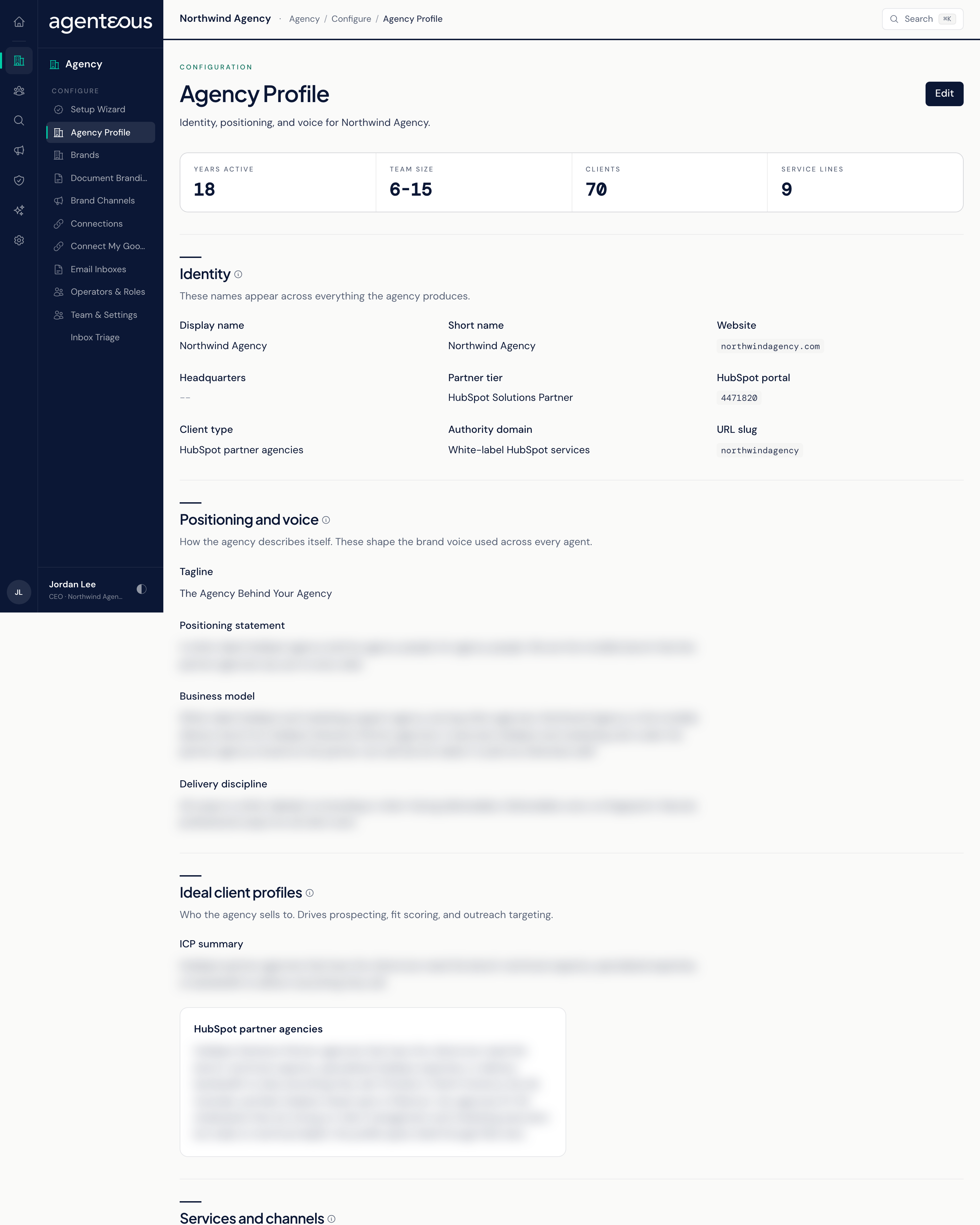
Viewing and Editing
The page opens read-only, with a row of headline figures (Years Active, Team Size, Clients, Service Lines) above the sections. Press Edit to switch to the form; an Editing badge appears. Save Changes writes your edits immediately and Cancel discards them. Agents pick up the new profile on their next run, with no restart.
Display Name and Website are required. The save is refused if either is blank. Fields the form does not show are kept as they are when you save.
Identity
The names and headline facts about your agency: Display Name, Short Name, Website, Headquarters, Partner Tier, Client Type, Authority Domain, HubSpot Portal and HubSpot Portal Id, Years in Business, Team Size, Client Count and URL Slug. Only the first two are required. HubSpot Portal and HubSpot Portal Id are filled in when you connect HubSpot in the Setup Wizard; do not change them unless support asks you to, because the CRM connection and HubSpot record links depend on them. URL Slug sets the address label used in links to your app and console. The rest give the agents context for what they write. Your agency id is set when the install is created and cannot be changed here.
Positioning and Voice
How your agency describes itself: Tagline, Positioning Statement, Business Model and Delivery Discipline. Together these form the brand-voice context the agents read before writing. The positioning statement matters most: two or three sentences on who you serve and what sets you apart.
Ideal Client Profiles
Who you sell to. Write an ICP Summary paragraph, then use Add ICP to define each named profile with a short name and a two or three sentence description (industry, size, pain points, what they buy). Remove deletes a profile; a profile with a blank name is dropped when you save. The agents read these profiles as part of their context when they qualify and write to prospects.
Services and Channels
Two lists, one item per line: Service Offerings (what your agency sells) and Distribution Channels (where it publishes, such as LinkedIn or an email newsletter).
Compliance
Regulators lists the marketing rules that apply to your work, one code per line (for example FTC, CAN-SPAM, CASL or GDPR). Firm Rules holds internal rules every piece of content must follow, such as "never name a client without written permission". The marketing agents receive both as part of their compliance context. Add only the rules that genuinely apply.
Primary Contact
The main contact for your agency: Name, Title and Email. The agents can use the contact's name, title and email in what they write.
Who Uses It
- Ops Admin, Admin Operator and CCO: edit and save the profile. Each save is recorded in the Audit Log with the list of fields that changed.
- Everyone with console access: reads the profile to check what the agents know about your agency.