Proposal Generator
The Proposal Generator turns a rough brief from an agency partner into a scoped, priced, client-ready proposal. You paste in whatever you were handed: an email, a Slack thread, notes from a scoping call, and the tool carries it through structured intake, a set of discovery questions, a set of architecture decisions, an hour estimate, and a finished narrative document. It is the one tool on this surface built for the moment before a project has a shape yet: there is no catalog to consult, because nobody has decided what is in scope.
What It's For
Reach for this wizard the moment a partner sends you something to scope: a new opportunity, an expansion of existing work, or a request that does not cleanly match one of the priced wizards yet. Run it before the Migration, Onboarding, Implementation, or Integration wizards have anything to work against; those tools price a scope you have already defined, and this one is how that scope gets defined in the first place.
How It Works
Every other pricing tool on this surface starts from a catalog: a list of features or deliverables someone has already priced in hours. This one does not, because its input is a paragraph of prose, not a checklist. That single difference explains most of what makes it behave differently from the rest: it is the only tool where a model supplies the base hours, and the only tool that produces a low-to-high hour range instead of a single figure.
The steps alternate between what a model reasons about and what code computes. Intake and Discovery ask a model to read your brief and surface what is missing. Architecture asks a model to propose the shape of the build. Estimation asks a model for nothing but a starting number and a skill tier per line item; every multiplier, allocation, and total from that point on is arithmetic, not judgment. Document hands those settled numbers to a model as facts it may describe but never change, then writes the proposal around them.
For what the skill tiers and their multipliers mean, and what the document actions (Regenerate, Humanize, Client Version) do, see the tools overview; this page covers only what is specific to a proposal.
Intake
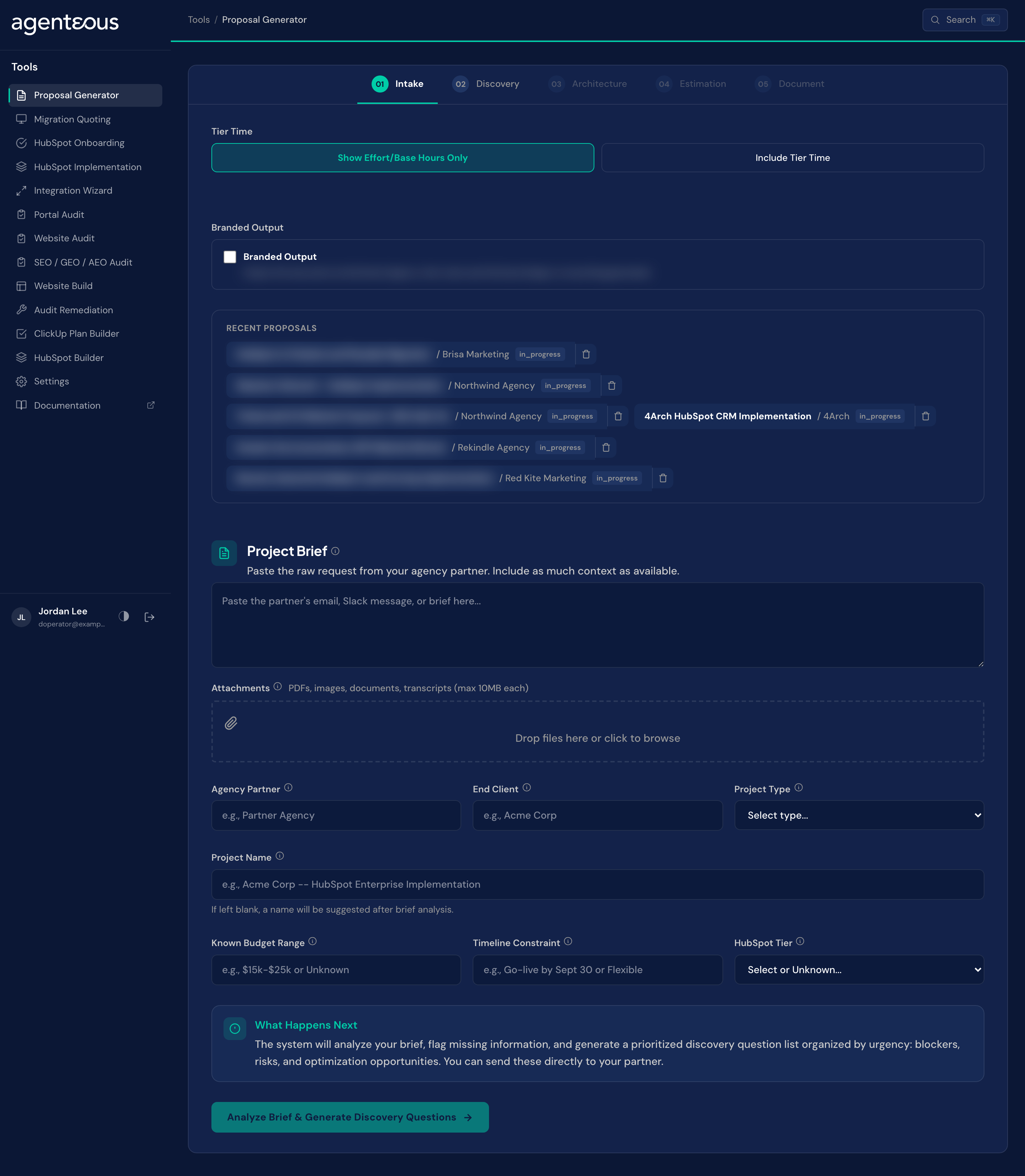
What you supply. The brief itself, pasted as text: the partner's email, a Slack thread, or scoping notes, plus any attachments such as PDFs, images, documents, or call transcripts (up to 10 MB each). Alongside it you fill in what you already know: the agency partner, the end client, a project type, a project name if you have settled on one, a known budget range, a timeline constraint, and the client's HubSpot tier if you know it. A Branded Output switch on this step adds an agency-branded PDF to the export buttons at the end. If your instance has Skill Tiers on, a Tier Time choice as well: "Show Effort/Base Hours Only" (the default) or "Include Tier Time", hidden entirely when that instance-wide setting is off.
What happens. The brief is analyzed and turned into a summary, a list of critical gaps, a set of risk factors, and a first read on complexity. That analysis is what feeds the discovery questions on the next step. If you left the project name blank, one is suggested for you here.
Behind the scenes. Two model passes run in sequence. A fast model reads the brief first and extracts the concrete entities: names, dates, systems mentioned, numbers. A stronger reasoning model then analyzes the brief as a whole and produces the summary, the gaps, the risks, and the complexity read that the extraction alone could not give you.
Discovery
What you supply. Answers, as they come in from your partner. The questions are generated for you; you paste answers inline as you get them.
What happens. You get a prioritized list of questions organized into three tiers: Blockers, which stop scoping until they are answered; Risks, which shift the estimate range depending on the answer; and Optimization, which improve the quality of the proposal if you happen to know them but do not block anything. Each question carries a short "why" explaining what it affects, and an "if unknown" line describing what the proposal does in the absence of an answer.
Behind the scenes. A model writes the questions, the why, and the if-unknown consequence from the gaps and risks the Intake analysis surfaced. Worth being precise about one thing here: an "if unknown" line may read something like "adds 30% contingency" or "widens the range by 20%." That is the model reasoning in prose about a plausible consequence, the same way a person scoping the work by hand would talk through it out loud. No code reads that sentence and applies a 30% or 20% adjustment anywhere. The only numbers that actually move the estimate are the ones produced in the Estimation step below.
Architecture
What you supply. A decision on each architecture item: click its status badge to mark it Confirmed, Proposed, or Needs Discussion, and add a note if you want to override or qualify the recommendation. You also decide which items in the risk register need a partner's attention before you finalize the estimate.
What happens. You get five to eight architecture decisions covering things like hub selection, the object model, and the integration approach, plus a short risk register. Each decision states what is being decided, why that option is recommended, what the alternatives were, and a cost impact comparing the options in hours at different skill tiers. Anything left as Needs Discussion is a flag that the estimate downstream is provisional on that point.
Behind the scenes. A model proposes the decisions and the risk register from the brief and the discovery answers so far, citing the reasoning and alternatives it weighed. The status of each decision, though, is entirely yours: the model proposes a default, but only you confirm it.
Estimation
What you supply. Review and edits. Each line item shows a skill tier and a base hour range; you can change either and the totals recalculate live. This is also where you can trigger a full recalculation if you have changed enough upstream answers to want a fresh pass.
What happens. You get a dashboard of hours grouped by build phase, a project management allocation shown as a percentage and its own hour figure, and a grand total presented as a range, with a "+/- N%" figure next to it. That percentage is exactly half the spread between the low and high total: a plainer way of expressing the same range, not a separate estimate of confidence. Whether those phase hours are shown tier-adjusted or as effort/base hours only follows the Tier Time choice you made at Intake; flipping that choice re-prices the same numbers without sending anything back through the model.
Behind the scenes. A model returns only two things per line item: a low and high base-hour figure, and a skill tier. Nothing else in this step is the model's. The tier multiplier, the project management add-on, the phase numbering, and every total are computed by code from those inputs. The project management allocation defaults to 10% of the raw base hours, before any tier multiplier is applied, not a percentage of the tier-adjusted hours: a Tier 3 crew does not need more project management than a Tier 1 crew scoping the identical work. The figure shown on your screen is whatever your instance has it configured to, and it is adjustable, not a fixed law. Whatever percentage you see next to "PM allocation" is the one actually used, applied to base hours, in the total below it.
Document
What you supply. A decision to generate the document, then a decision on what to do with it. If you send it to PandaDoc, you also supply the recipient's email address by typing it in yourself.
What happens. The narrative renders as a numbered proposal: an overview, the scope, the architecture decisions, the estimate, and the phasing, all built around the numbers that were already settled in the previous step. From here you can regenerate the writing, humanize its tone, produce a client-facing version, or send it out.
Behind the scenes. The numbers are computed first and handed to a strong reasoning model as fixed facts it is not permitted to recalculate; its job is to describe those numbers in prose, not to check them. Regenerate reruns that writing pass on the same numbers. Humanize is a style-only rewrite that must not touch any figure. Generate Client Version strips the internal detail (tier columns, multipliers, variance notes); it appears only when the quote was priced with Tier Time on, because with Tier Time off the document is already written client-style. See the tools overview for what that strip removes and keeps. Send to PandaDoc runs no model at all. It creates a document from your PandaDoc template for the recipient email you type in and waits until PandaDoc shows it as a draft; it does not email the recipient. You open the draft in PandaDoc and send it from there, so this button is not the last step before your partner's inbox. It works only when your agency has connected PandaDoc and set up a proposal template; if it has not, the button reports a configuration error. Print PDF, Branded PDF, Copy Markdown and Download XLSX are local exports and write nothing outside the tool.
Recent Proposals
Every proposal you generate is saved automatically and listed under Recent Proposals on the first screen. Any signed-in teammate can open a saved proposal, so a partner conversation can be picked up by someone else.
What Good Looks Like
A proposal worth sending reads like someone who understood the brief wrote it, not like a template with the client's name swapped in. The overview should reference specifics from what was pasted in at Intake, not generic language that could describe any project. The discovery questions should feel like the questions you would actually ask a partner before committing to a number, and the ones marked Blockers should genuinely be things you cannot scope around.
The estimate range should narrow, not widen, as you work through the wizard. A wide range at Estimation usually means several Discovery questions came back unanswered or several Architecture items are still Needs Discussion; resolving those before you generate the document is what makes the number defensible rather than a wide-cast guess.
Treat the range itself as what it is: a spread between a low and high base-hour figure a model estimated from prose, adjusted by the tier and overhead math the same way every other estimate on this surface is. It is not a statistical confidence interval, and the "if unknown" consequences you saw at Discovery are reasoning, not a formula that ran behind the scenes. If a number in the final document looks wrong, the fix is to revisit the estimate step and adjust the line item directly, not to ask the document step to reason about it again: it has already been told the numbers are fixed.
Who Uses It
Anyone on your team who can sign in to the tools, usually whoever answers partner briefs and writes proposals. Administrators set the Proposal Generator defaults in Tools Settings.
Related
- Tools Overview: how the estimate spine and the document steps work.
- ClickUp Plan Builder: turn a saved proposal into a project plan.
- Tools Settings: the Proposal Generator defaults.