SEO / GEO / AEO Audit
Point the tool at a domain and it produces a client-ready visibility audit: how the site ranks in Google, how it stacks up against named competitors, and whether the brand actually gets recommended when someone asks Google's AI assistant, ChatGPT, Claude, or Perplexity a buying question. Real search and answer-engine data is collected first, deterministic code scores it across four to five areas, and a model writes up what the numbers mean and what to do about them. The result is a scored report you read on screen, download as a PDF, and can promote into ongoing monitoring.
What It's For
Run this audit when the question is visibility: can the client be found, in search and in the answer engines, and how do they compare to their rivals. It is the tool for a pitch that turns on "you are invisible in ChatGPT and your competitor is not," for a new client's baseline, or for the evidence behind an SEO or content retainer.
It answers a different question from the other two audits on this surface. The Website Audit grades a site's technical build: performance, accessibility, security, the code. This one grades the site's reach: rankings, authority, keyword gaps, and answer-engine presence. A site can be technically clean and still invisible, or technically rough and still ranking. Run the Website Audit to judge the machine; run this to judge how the market finds it.
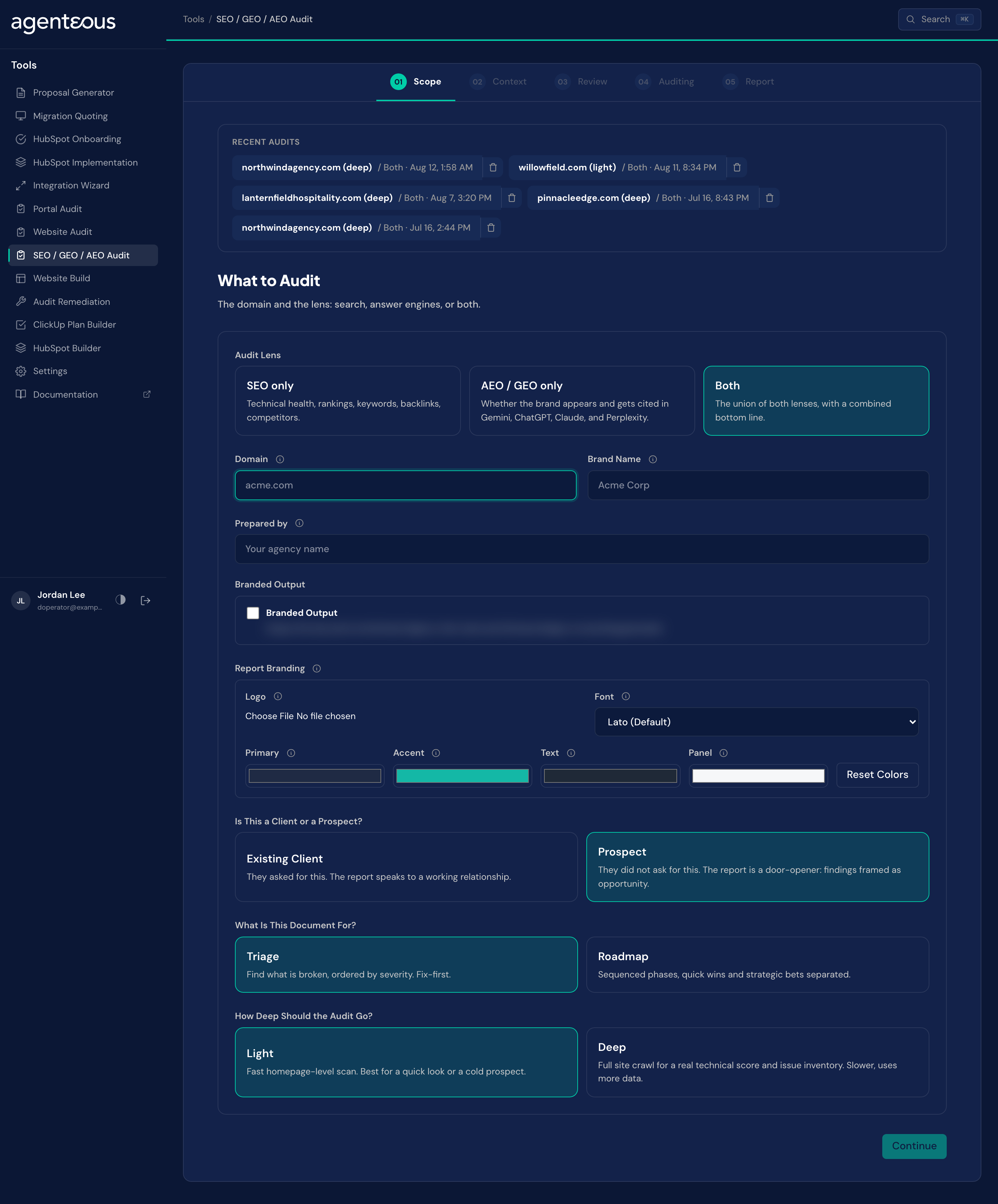
The three lenses let you scope which half of the question you are asking:
- SEO only looks at classic search: technical health, rankings, keywords, backlinks, and competitors.
- AEO / GEO only looks at the answer engines: whether the brand appears and gets cited when Google's AI assistant, ChatGPT, Claude, and Perplexity are asked the prompts you supply.
- Both runs the union and writes a combined bottom line.
This is the one-shot deliverable. Its ongoing counterpart is the app's visibility monitoring, which watches the same signals over time; the report's Promote to monitoring button is the bridge from one to the other.
How It Works
Like the other audits, the order matters: the evidence and the scores are settled before the model writes a word.
First the tool collects hard signals. From a search-data provider it pulls the domain's ranking overview, its ranked keywords, its backlink profile, and the same for each competitor you named; it checks live search positions for the terms that matter and computes the keyword gap against rivals. For the answer-engine lens it puts your prompts to all four engines and records where the brand is mentioned and where a competitor is named instead. Where the audit is for an existing client who has connected them, it folds in first-party history from Google Search Console and GA4. None of that is a model's opinion; it is what the search index, the engines, and the analytics actually returned.
Crawling is done by the same search-data provider, so the audit reads the site through a search engine's eyes rather than fetching pages directly.
Ordinary code then turns that evidence into scores, described below. Only once the numbers are fixed does a model see the audit. It receives the collected evidence and the computed scores and writes the analysis: the at-a-glance headline, a card per finding (what is working, what is concerning, what the opportunity is), the prioritized recommendations, and the bottom line. It is forbidden from changing a score or inventing a metric. So the scorecard is arithmetic you could reproduce; the judgment about what it means is the model's, grounded in evidence it was not allowed to invent.
The Scorecard
The report leads with an overall score out of 100 and a score for each area. Four areas are always on offer, and a fifth appears on answer-engine runs for a domain that has a registered customer agent. The areas, with the weight each carries in the overall score:
- Technical health carries the most weight (30). On a light run it reads the homepage's technical signals; on a deep run it becomes the share of crawled pages without errors.
- On-page and content (25) measures how clean the on-page signals are, homepage-only on a light run and across the crawl on a deep one.
- Off-page authority (20) places the domain's backlink strength against the competitors in the run, so it is a relative standing, not an absolute count.
- Answer-engine visibility (25) is the brand's mention rate across your prompts and the four engines.
- Customer Agent knowledge (10) appears only when the answer-engine lens runs and the domain has a registered customer agent. It scores how much of the content the agent was set up to learn from is live, and halves that score when the agent's regular refresh has not run recently.
The overall score is a weighted average of the areas that were actually measured. An area the run did not touch, an SEO-only audit has no answer-engine score, a cold prospect has no first-party history, simply drops out of both the average and its denominator rather than counting as a zero. Each score is banded by colour on its own: green from 67 up, a neutral tone through the middle, red below 34. An area with no score reads "N/A" and stays out of the maths.
Light and Deep
Light is a fast, homepage-level read: a single technical snapshot, the ranking and backlink overview, the answer-engine check. It is the right depth for a cold prospect or a quick look, and it uses less data.
Deep commissions a full-site crawl, up to a capped number of pages, plus a referring-domains pull that surfaces spammy backlinks worth disavowing and ranked-keyword detail for the top competitors. The technical and on-page scores switch from homepage-only to crawl-wide ratios, so they describe the whole site rather than one page. It is slower and costs more data.
Cold or Connected
Every audit runs on public data alone, which is what makes a cold prospect audit possible: point it at a domain you have no access to and it still returns rankings, backlinks, competitors, and answer-engine presence.
For an existing client, connecting Google Search Console and GA4 adds first-party history the public web cannot show, real impressions, clicks, and sessions. That connection is handled carefully. This install reads through its own Google identity, and the client grants that identity Viewer access to their property; no client Google login is ever stored. The tool checks that the access actually works before the run and, if it does not, quietly falls back to a cold audit rather than failing.
Scope
What you supply. The lens (SEO, AEO / GEO, or both), the domain, the brand name, and optionally your agency's name for the report cover. Under Report Branding you can add a logo (up to 300 KB), four colors and a font; these restyle the downloadable PDF. Then three choices that shape the run.
Starting an audit, checking data sources and promoting an audit to monitoring all require permission to manage marketing content. If Start is refused, ask an administrator to grant it.
Audience: client or prospect. For a prospect who did not ask, the report is written as a door-opener, findings framed as opportunity, and it runs on public data. For an existing client it speaks to a working relationship and can draw on connected first-party data. The choice also decides whether the data-sources panel appears on the next step.
Goal: triage or roadmap. Triage orders the output by severity, fix-first. Roadmap sequences the work into phases and separates quick wins from strategic bets. This changes how the document reads; it does not change the findings.
Depth: light or deep. As above: a fast homepage-level scan, or a full-site crawl for a real technical score and issue inventory.
Behind the scenes. No model runs here.
Context
What you supply. All optional, and each piece sharpens the audit rather than gating it.
- Answer-engine prompts, one per line: the actual buying questions you want put to the engines, such as "best CRM for small business." Each prompt is run across all four engines, so a long list raises the cost. The tool shows a cost warning past twelve prompts, and sets hard limits of 50 prompts, 50 target keywords and 25 competitors: Continue is disabled until the list is back under the limit.
- Target keywords the client wants to rank for, so the audit checks where they currently sit.
- Competitor domains, which anchor the rankings comparison, the keyword gap, and the answer-engine share of voice.
- Market or location for where rankings are measured, and free-text notes to steer the writer.
Data sources (client audits only). When the audience is a client, a panel lets you enter the client's Search Console property and GA4 property ID and check that this install's Google identity can read them. Confirmed access enriches the run; unconfirmed access simply runs it cold. It never blocks Continue.
Review
What you supply. A confirmation. The screen restates the domain, the lens, the audience, the deliverable, and the counts of prompts, keywords, and competitors, alongside a plain note of what is about to run.
Behind the scenes. No model runs here either.
Auditing
What you supply. Nothing. This is a progress display, and it takes a few minutes because real search data and four answer engines are being queried, and on a deep run a full crawl is underway.
What happens. The phases run in order and the screen names each: collecting the signals, crawling the site on a deep run, then synthesizing the report. Only the last phase involves a model.
You can leave. The run continues on the server. If the connection drops or you close the tab, the audit keeps going and reappears under Recent audits when it is done; reopen it from there.
Report
What you get. A scorecard with the overall score and the area scores, each in its colour, with a coverage note saying how much was measured. A benchmarks table placing the site against the competitors you named, each metric marked Leading, On par, or Lagging. An at-a-glance headline with stat boxes. Then the findings as cards, split into search and answer-engine sections and colour-coded working, concerning, or opportunity, each with its "so what," its "why," and its "what next." A recommendations table with a type, a priority, and an effort estimate per action. And the bottom line. The run's data and model cost is shown at the foot for internal reference.
What you can do. Download the report as a PDF (branded if you set Report Branding), export the raw data, or start a new audit. And Promote to monitoring, which turns this one-shot audit into an ongoing engagement: it carries the competitors and any connected Search Console and GA4 binding forward, seeds the tracked answer-engine prompts and keyword targets, and generates a starting strategy, so the next sweep begins without re-entering anything. Promoting the same audit again refreshes the engagement instead of creating a second one. Promote a cold prospect audit the moment they become a client and their monitoring starts from the baseline you already have.
Behind the scenes. Nothing new runs on this step; the report is a rendering of the audit that was already computed.
What Good Looks Like
A sound audit reads as though someone who knows search spent an afternoon with the domain. The findings point at specific evidence, a real ranking, a named competitor pulling ahead, an engine that recommends someone else. The bottom line says something a partner could not have guessed from the homepage. The recommendations' top items are genuinely worth doing, not merely easy.
Three things are worth knowing.
An area reads "N/A." That area was not measured this run, an SEO-only lens has no answer-engine score, a cold audit has no first-party history. It is excluded from the overall, not counted as a failure. If you expected a score there, check the lens and, for a client, whether the data sources connected.
Answer-engine findings are thin. If the AEO section is sparse, you probably ran few prompts or none. The engines only reveal what you ask them; feed the audit the real buying questions in the client's category and re-run.
A deep run came back partial. A full crawl can time out on a very large site and is labelled as partial rather than failing. The technical and on-page scores then rest on the pages that were reached; note it before presenting those two numbers as the whole site.
Two habits worth keeping. Answer-engine prompts cost money on every run because each is put to four engines, so keep the list to the questions that matter. And the report names competitors and quotes what the engines say about them; it is a candid account of a market, so treat the export accordingly.
Who Uses It
Anyone on your team who can sign in to the tools, usually whoever prepares search and AI-visibility reviews for clients and prospects.
Related
- Website Audit: grade the site itself: speed, accessibility, security and conversion.
- DataForSEO: the search data connection behind the audit.
- Tools Overview: how the tools fit together.