Website Build
The Website Build Wizard prices a HubSpot CMS website project end to end: a new build, a migration off WordPress or another CMS, a portal-to-portal rebuild, or a theme swap. You describe the project, pick the modules the site needs, describe anything unusual in plain English, and the wizard turns all of it into a phased estimate and a statement of work. With Tier Time on, the agency and client versions are written in one pass.
What It's For
Reach for this wizard when the ask is the website itself: a new site, a CMS migration, a theme change, or a portal-to-portal rebuild on HubSpot's CMS. If the client also needs the surrounding HubSpot portal built out (pipelines, properties, workflows) beyond what the site touches, that scope belongs in the HubSpot Implementation Wizard instead.
How It Works
Most of a website estimate is catalog work, the same as the wizards described in the tools overview: pick a project type, scope the pages and templates, select the modules the build needs, and the hours follow from a price list. Design work is the one place project type and design approach interact directly. Bring your own designer and the wizard adds a design phase, priced at ten hours per template. A client-supplied design or a theme-based build skips that phase entirely, because there is nothing bespoke left to design.
Custom features work differently, and this is the one part of the wizard worth understanding closely. Anything you need that is not in the module catalog goes through a model instead of a price list. You describe the feature in plain English: what it needs to do, anything unusual about how it should behave. A model reads that description and proposes a starting point, both hours and a skill tier. Standard custom development sits at the mid tier; complex integrations, serverless functions, and advanced JavaScript sit at the tier above that. The model may also come back with clarifying questions if your description left something open.
The model also checks your description against what the base scope engine, theme setup, template development, page and blog content migration, and module installation, already prices. When a described feature overlaps that work, it flags the line "Partially Covered By Base Scope" and proposes only the incremental hours on top of what the scope engine already charges, rather than pricing the whole feature again from scratch.
None of that proposed number is priced yet. It lands on the AI Review step, which exists for exactly one reason: you look at the model's guess before it becomes real money. You can change the hours, change the tier, answer its questions in your own words, and click Recalculate to have it reconsider with your answers folded in. Only once you click Confirm does that feature's hours enter the estimate. The model is being asked to guess. The guess stays visible the whole time. The number that finally counts is the one you signed off on.
The AI Review step also reads you the project's overall risk: the main variable worth watching across the build, and what would push it outside a straightforward lift-and-shift. That reading is the model's judgment too, formed only after it has seen every feature you described, not a rule triggered by a threshold.
Once every custom feature is confirmed, the estimate itself is arithmetic: base hours from the catalog plus the confirmed custom hours, tier multipliers applied, overhead added, phased and totaled. Nothing on the Estimate step is a model's opinion; it is all numbers that were already settled by the time they got there.
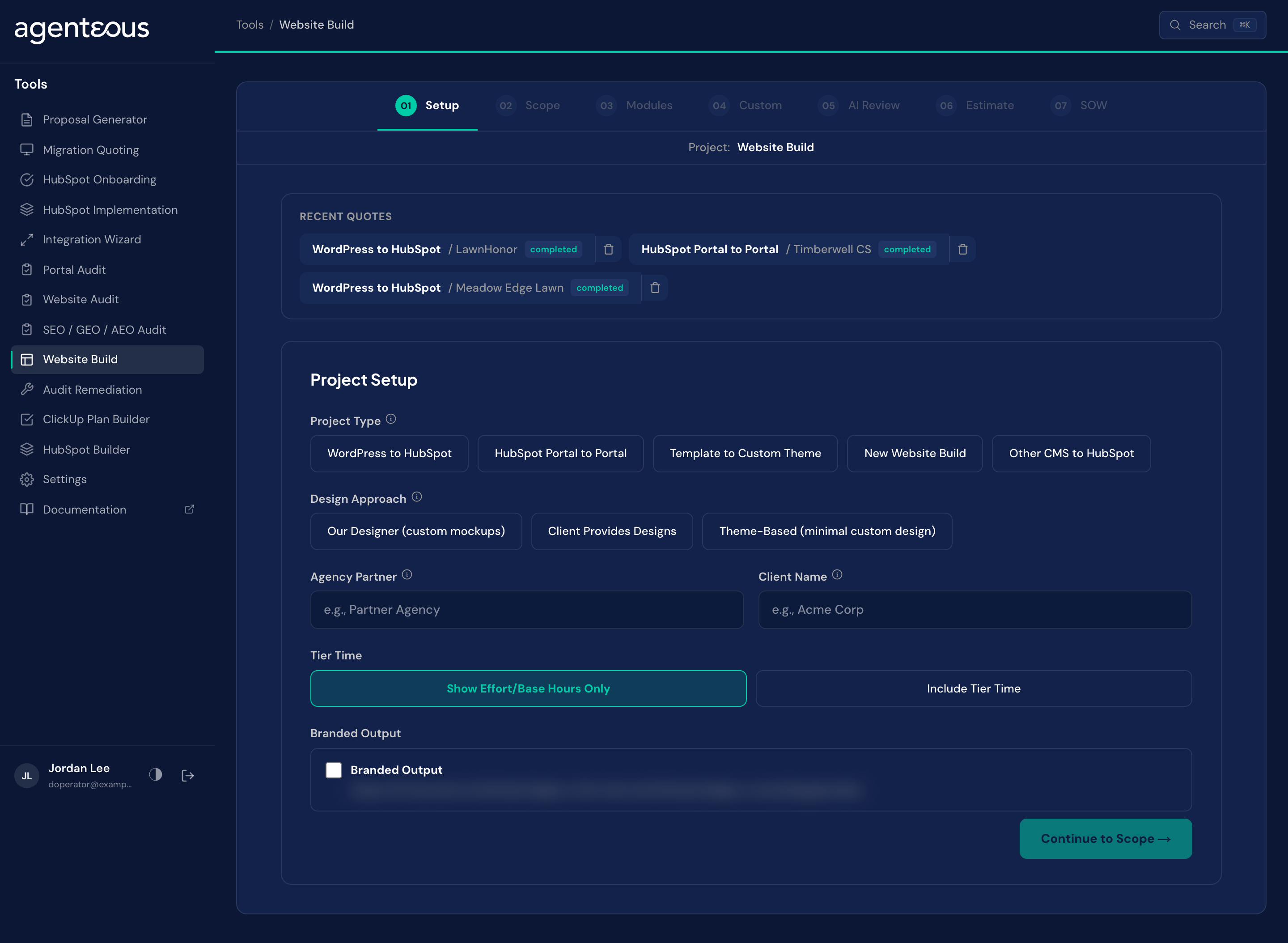
Setup
What you supply. The project type (WordPress to HubSpot, HubSpot portal to portal, template to custom theme, a new build from scratch, or another CMS to HubSpot), the design approach (your own designer, client-provided designs, or a theme-based build), plus the agency partner and client names. If your instance has Skill Tiers on, a Tier Time choice: "Show Effort/Base Hours Only" (the default) or "Include Tier Time". If your instance also has AI Acceleration on, a Delivery Model choice: "Manual Delivery" (the default) or "AI-Assisted Delivery". Either choice is hidden entirely when its instance-wide setting is off.
What happens. Project type sets which standard modules the wizard pre-selects for you and the baseline assumption about how complex the build is, before you have entered a single page or template. Design approach decides whether a design phase enters the estimate at all: your own designer adds one, priced at ten hours per template; the other two options skip it. A Branded Output switch adds an agency-branded PDF button to the exports. Tier Time and Delivery Model are saved with the quote; see the tools overview for what each does across the whole estimate.
Behind the scenes. No model runs on this step. It is a lookup: project type and design approach each map to a fixed set of defaults.
Scope
What you supply. The number of templates, the number of pages, how many blog posts are migrating, and how many forms the site needs. Underneath those, three Scope Gates checkboxes, all unchecked by default on a new quote: Discovery Already Completed omits the entire Discovery & Planning phase, for a build where discovery already happened separately, for example in a paid-discovery motion. Client Provides Final Content omits only the per-page Page Content Migration line; blog QA, forms, and redirects are priced regardless. Customize Selected Modules adds per-module customization hours on top of the base module price; leave it unchecked when modules are used as shipped.
What happens. Templates are unique page layouts, and they drive design hours because a designer prices per layout, not per page. Pages share templates, so adding pages scales the build hours but leaves design hours untouched: ten pages built from three templates cost more to build than three pages would, but no more to design. Blog posts are migrated as they stand; the hours cover quality checking and cleanup, not rewriting anyone's content. Each form counts as the form itself, the thank-you handling after submission, and the workflow that acts on it, because that is what actually gets built. A quote saved before the Scope Gates existed keeps behaving the way it always priced: it treats Customize Selected Modules as if it were checked, so a legacy quote's module-customization lines do not silently disappear.
Behind the scenes. No model. These figures multiply against catalog rates.
Modules
What you supply. A selection from the catalog of pre-priced modules built into every site: navigation and structural pieces, hero sections, card and feature layouts, and more. Select individual modules, or use Select All and Clear All to move faster.
What happens. Each module you select adds its fixed hours to the running total, shown to you live as you go. Anything you need that is not on this list does not belong here at all: it belongs on the next step. If Customize Selected Modules was checked back on Scope, the Estimate step lists one Module Customization line per selected module rather than a single combined line, so you can see and edit each module's own customization hours.
Behind the scenes. No model. It is a price list.
Custom
What you supply. A plain-English description of each feature the module catalog does not cover: what it should do, anything unusual about how it behaves.
What happens. Each description you write becomes one line the wizard sends off to be estimated. Nothing is priced yet; this step only collects what needs building.
Behind the scenes. A model reads each description and proposes hours and a skill tier: the mid tier for ordinary custom development, the tier above for complex integrations, serverless functions, or advanced JavaScript. It may also return clarifying questions where your description left something unresolved. None of this is final. It is a draft, waiting for you on the next step.
AI Review
What you supply. For every proposed feature, a look at the model's proposed hours and tier, and a decision. Edit the hours if your own read of the work differs. Change the tier if the model picked wrong. Answer any clarifying questions in plain English and click Recalculate to have the estimate reconsider with your answers folded in. When a feature looks right, click Confirm. A feature flagged "Partially Covered By Base Scope" is worth a second look before you confirm it: the number you are reviewing is meant to be only the work on top of what the scope engine already prices, not the whole feature.
What happens. Only confirmed features carry their hours into the estimate. This step also shows an overall read on the project's risk: the main variable worth watching, and what pushes the project outside a straightforward lift-and-shift.
Behind the scenes. This is one of only three places in the tools where a model's raw number is allowed to become an input to the arithmetic at all; the others are the Proposal Generator and the Audit Remediation Wizard. It is fenced on both sides here: the model has to show its guess, and you have to confirm it before it counts. The risk reading is the model's judgment as well, formed only after it has seen every feature you described.
Estimate
What you supply. Adjustments if the defaults do not fit: project management percentage, contingency percentage, hours available per week. If a paid marketplace theme is part of the build, its price goes in a separate field.
What happens. The tiles show base hours, tier-adjusted hours, the grand total, the timeline, and the complexity rating. A website estimate carries project management and contingency overhead, each defaulting to 5% and adjustable per quote in the Adjust panel. There is no instance-wide setting for these two rates, and the Global Defaults in Tools Settings do not change them. Unlike a migration or implementation quote, there is no testing line here at all. Moving either slider recomputes the estimate but keeps any hours you already edited by hand; changing Scope, Modules, or a confirmed custom feature still recalculates fully. The marketplace theme's price is recorded for the client estimate but never folded into the hours, because the end customer buys that theme directly and it is not the agency's build time. Phases are numbered P1, P2, and onward, each with its own subtotal. The AI-assisted delivery choice exists here too, but under the evidence gate described in the tools overview no website build module currently qualifies for acceleration (measured delivery data shows CMS and page work is not faster with AI), so an AI-assisted website quote shows no adjustment line and its hours match a manual quote.
Behind the scenes. No model. Everything here is arithmetic over numbers already settled: the catalog totals, the confirmed custom-feature hours, and the multipliers and overhead you set.
SOW
What you supply. A choice to regenerate the narrative, humanize its style, or, when Tier Time is on, move between the agency and client versions, plus the download and save actions common to every wizard's document step.
What happens. With Tier Time on, this wizard writes the agency version and the client version in the same pass, so you can switch between them. With Tier Time off, it writes a single document. The narrative states the project's complexity rating and explains why in plain terms, for example calling a project complex because of the volume of blog content to migrate rather than because the development itself is difficult.
Behind the scenes. A model writes the narrative from numbers that are already fixed by this point. It is not allowed to recompute anything; it describes the scope, the phasing, and the reasoning behind the complexity call around figures it cannot touch.
Recent Quotes
Saved quotes are listed under Recent Quotes on the Setup screen. The estimate's export buttons are Print PDF, Branded PDF (when Branded Output is on), Copy Markdown and Download XLSX.
What Good Looks Like
A custom feature's proposed hours look nowhere near what you would quote yourself. The AI Review step exists for this. Edit the hours directly rather than accepting a number that does not match your own read of the work; the model has not built a hundred sites like your team has.
The tier looks wrong: a small form tweak lands at the developer tier, or a serverless integration lands at the standard tier. Change it on the AI Review step. Tier decides the multiplier that gets applied, so getting it right matters as much as getting the hours right.
The complexity rating reads Complex for a project that felt straightforward to scope. Read the narrative's stated reason rather than the label alone. A project can be rated complex for reasons that have nothing to do with development difficulty, like a large volume of content to migrate.
Who Uses It
Anyone on your team who can sign in to the tools, usually whoever scopes and prices website builds. Administrators set the website content and development defaults in Tools Settings.
Related
- Tools Overview: the estimate spine, Tier Time and the document steps.
- Website Audit: grade the current site before you scope the rebuild.
- Tools Settings: the website content and development defaults.